




Browser fallback testing checks the branch your main browser may never choose. For Nigerian frontend learners building forms or dialogs, a working native feature in Chrome cannot establish that the alternative path behaves correctly. Record both the support check and the branch that actually runs.
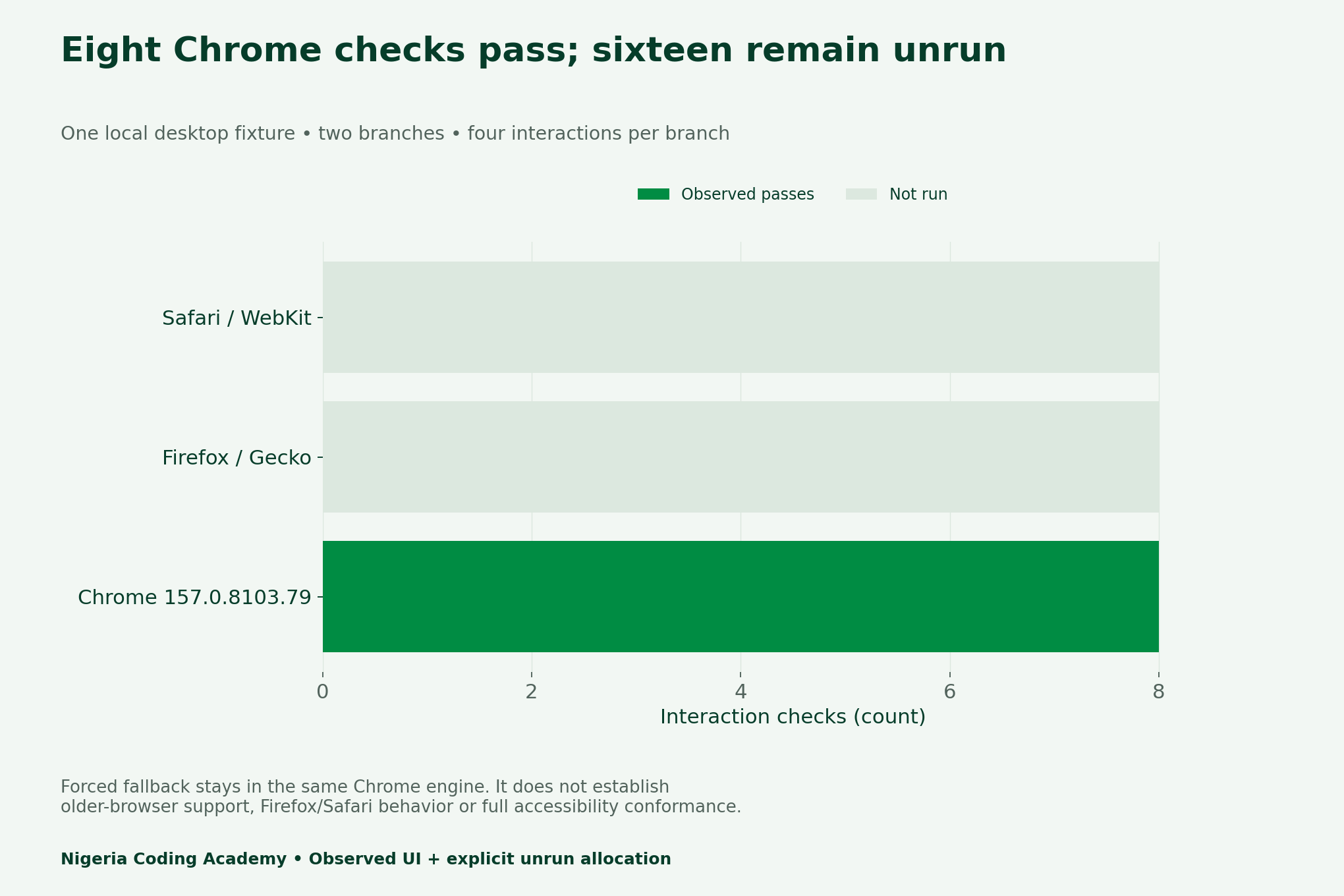
We tested one authored desktop dialog fixture in Chrome 157.0.8103.79. Four interaction checks passed on the native path and four passed with fallback forced. The broader matrix has 24 cells; sixteen Firefox and Safari checks remain unrun. Those missing observations are not hidden inside an eight-of-eight headline.
Why browser fallback testing needs a separate record
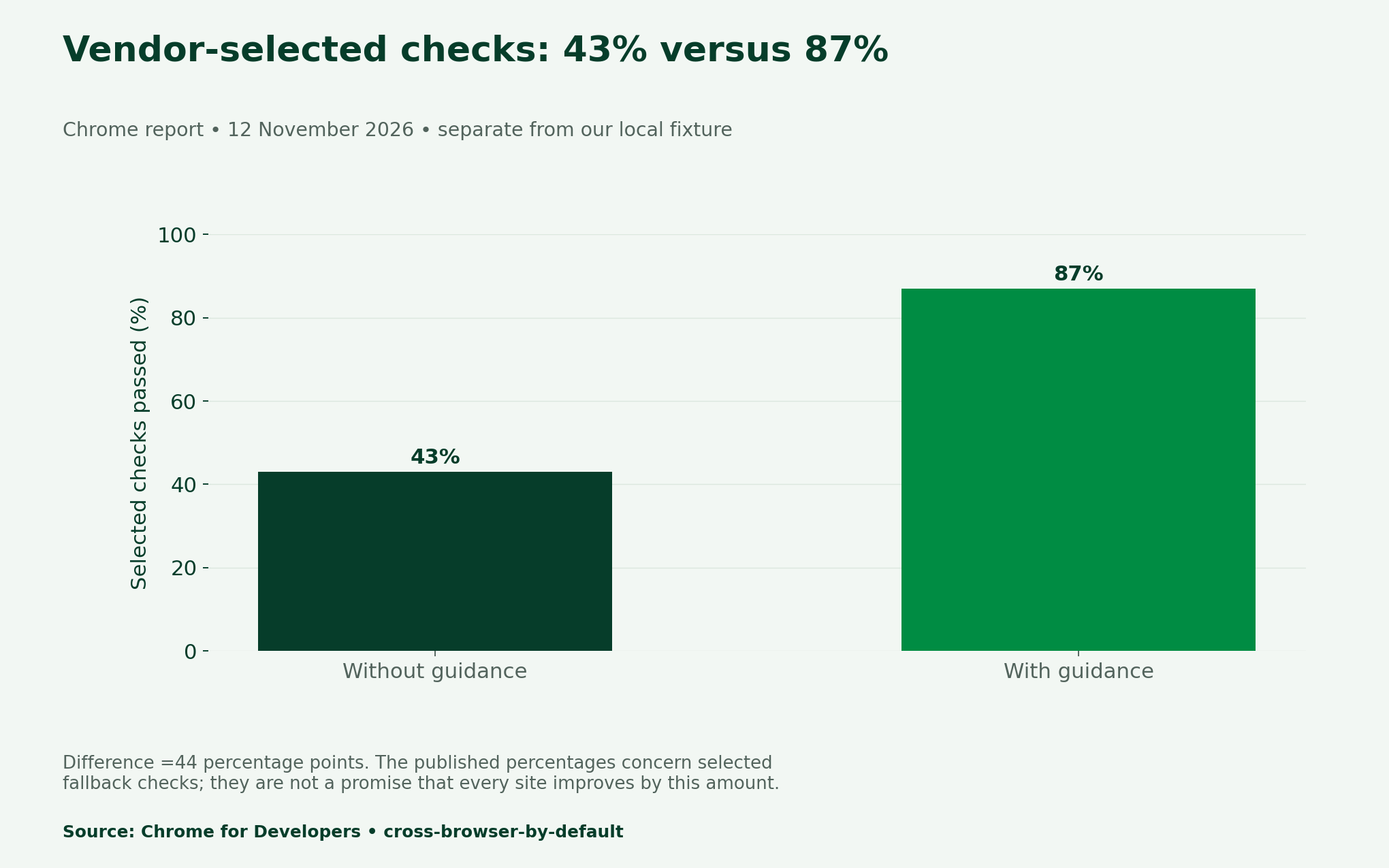
Chrome’s 12 November fallback report gives 43% without guidance and 87% with Modern Web Guidance on selected checks involving features not supported across all major browsers. The difference is 44 percentage points. These vendor-reported percentages are not findings about every website or the local dialog tested here.
The 13 November recap confirms Modern Web Guidance 1.0 is stable. That news is a useful prompt to inspect compatibility, not permission to assume an agent chose the right fallback. Start with the browsers your users actually need, then test specific interactions.
Define the fixture’s declared behaviour
First, our fictional order-confirmation dialog declares three ways to close: a visible button, a backdrop click and Escape. Each dismissal must return focus to the Open dialog control. Opening must show the panel and place focus on its Close dialog button. No form submission or order transaction occurs.
The MDN dialog reference distinguishes light dismissal, platform dismissal and developer-specified closing. It documents closedby=”any” for all three. Our native branch uses showModal with that declaration. We do not assume that support for the basic dialog element guarantees support for every newer attribute.
Verify which branch actually runs
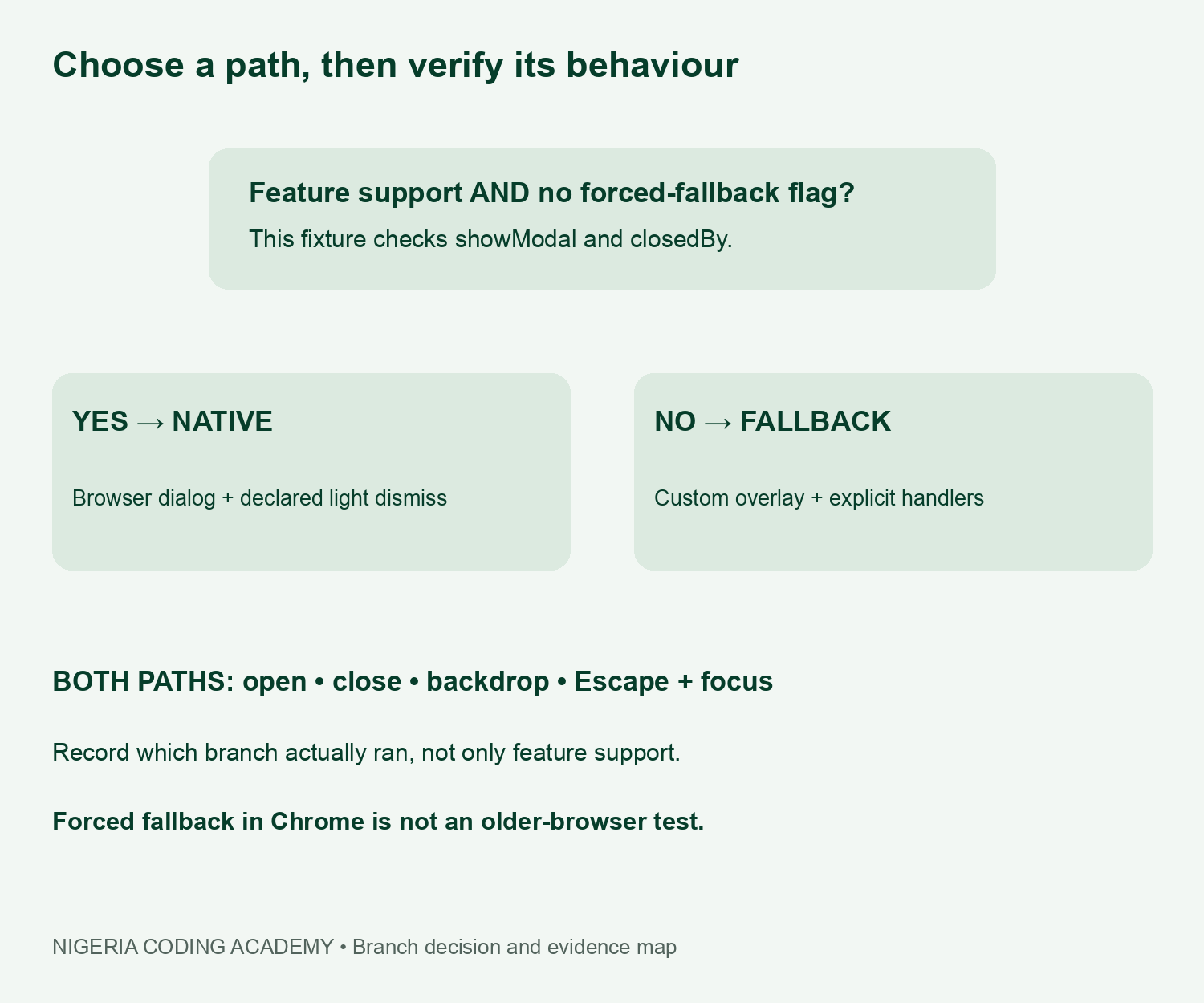
Next, the page shows Native dialog path when showModal and closedBy exist and no force flag is set. Adding fallback=1 in the query string selects the authored overlay instead. The page also displays the browser’s reported full version. We read those visible fields before the checks.
This deliberate force switch helps reveal an untested code branch while keeping the browser fixed. However, it cannot recreate an older browser’s parsing, focus rules or missing APIs. In particular, our small overlay still uses modern inert behaviour. It is a teaching fixture, not a complete compatibility polyfill.
What the eight observed checks cover
| Interaction | Required observation | Chrome native | Chrome forced fallback |
|---|---|---|---|
| Open | Panel visible; Close button focused | Pass | Pass |
| Close button | Panel closed; focus returns to opener | Pass | Pass |
| Backdrop | Declared dismissal; focus returns | Pass | Pass |
| Escape | Keyboard dismissal; focus returns | Pass | Pass |
For the opening check, we inspected the dialog state and focused element after clicking Open dialog. For each closing check, we reopened the panel, performed the declared action and inspected closure plus focus return. Escape came from the focused Close button. The observations preserve active-element identifiers alongside outcomes.
For backdrop checks, a fixed marker at the viewport’s upper-left identifies a point outside the panel. It ignores pointer events, so the click reaches the real backdrop. We checked its bounds against the panel before using it. This avoids accidentally clicking an inside control and calling that a backdrop test.
Keep the denominator and limitations visible
The result is eight observed passes out of eight attempted checks, not 24 passes. There were no Firefox or Safari executions. There were also no repeated attempts, mobile back-gesture checks or screen-reader sessions. This exercise cannot establish a cross-browser success rate or full accessibility conformance.
Similarly, a forced fallback pass in current Chrome does not establish compatibility with an older target that lacks inert. Choose a vetted implementation and test real supported environments before shipping. For a production dialog, extend the checks to multiple focusable controls, Tab and Shift+Tab, zoom, nested content and assistive technology.
Use the matrix in a Nigerian frontend portfolio
Record the actual browser, engine, version, operating system, viewport, detected support and executed branch. Then keep expected and observed behaviour in separate columns. A screenshot can support visibility, while focus identifiers support a narrower keyboard-state observation. Neither alone proves every interaction works.
For study groups, one learner can implement a deliberate fallback defect while another uses the same declared checks to find it. That would be a new experiment and needs a new result record. Do not quietly replace this fixture’s observations or claim the eight checks represent Nigerian users’ browser distribution.
Download the browser fallback testing kit
- Eight observed Chrome interaction checks (CSV)
- Twenty-four-cell executed and unrun matrix (CSV)
- Separate vendor percentages and difference (CSV)
- Blank browser and interaction ledger (CSV)
- Local HTML fixture, observations and instructions (ZIP)
Finally, read the README before running the local fixture and compare the branch label with your intended test. Our controlled evaluation tutorial explains fixed contracts and unrun plans. The Android diagnostics protocol also separates configuration from inspected evidence. Use the same discipline before trusting any green compatibility result.
Unlock Your Unique Tech Path
Get expert tech consulting tailored just for you. Receive personalized advice and solutions within 1-3 business days.
Get Started


