




GitHub CLI event streams offer a new way to wait for pull request changes, but an arriving event is not the same as a verified current state. Nigerian coding learners can practise that distinction locally before connecting a script to a real repository.
Our teaching kit runs six synthetic event-handling cases without GitHub credentials or network requests. It also calculates three ten-minute polling schedules: 120, 40 and 10 planned queries. Therefore, treat those counts as arithmetic baselines. They do not measure API savings, data-bundle savings or GitHub’s delivery reliability.
What changed for GitHub CLI event streams?
GitHub’s 18 November announcement adds event-stream support in CLI version 2.105.0. It prints events as JSON lines and exits after one event by default. Count, follow and timeout controls support other waiting patterns. However, access remains a preview that requires Event Streams waitlist approval; upgrading the CLI alone does not establish access.
The Event Streams preview notice explains that a client can receive pull-request changes without hosting a public webhook receiver. That may suit a learner’s laptop or a small automation script. However, this report does not activate a subscription, join the waitlist or test the live preview service.
Define the state you need before choosing an event
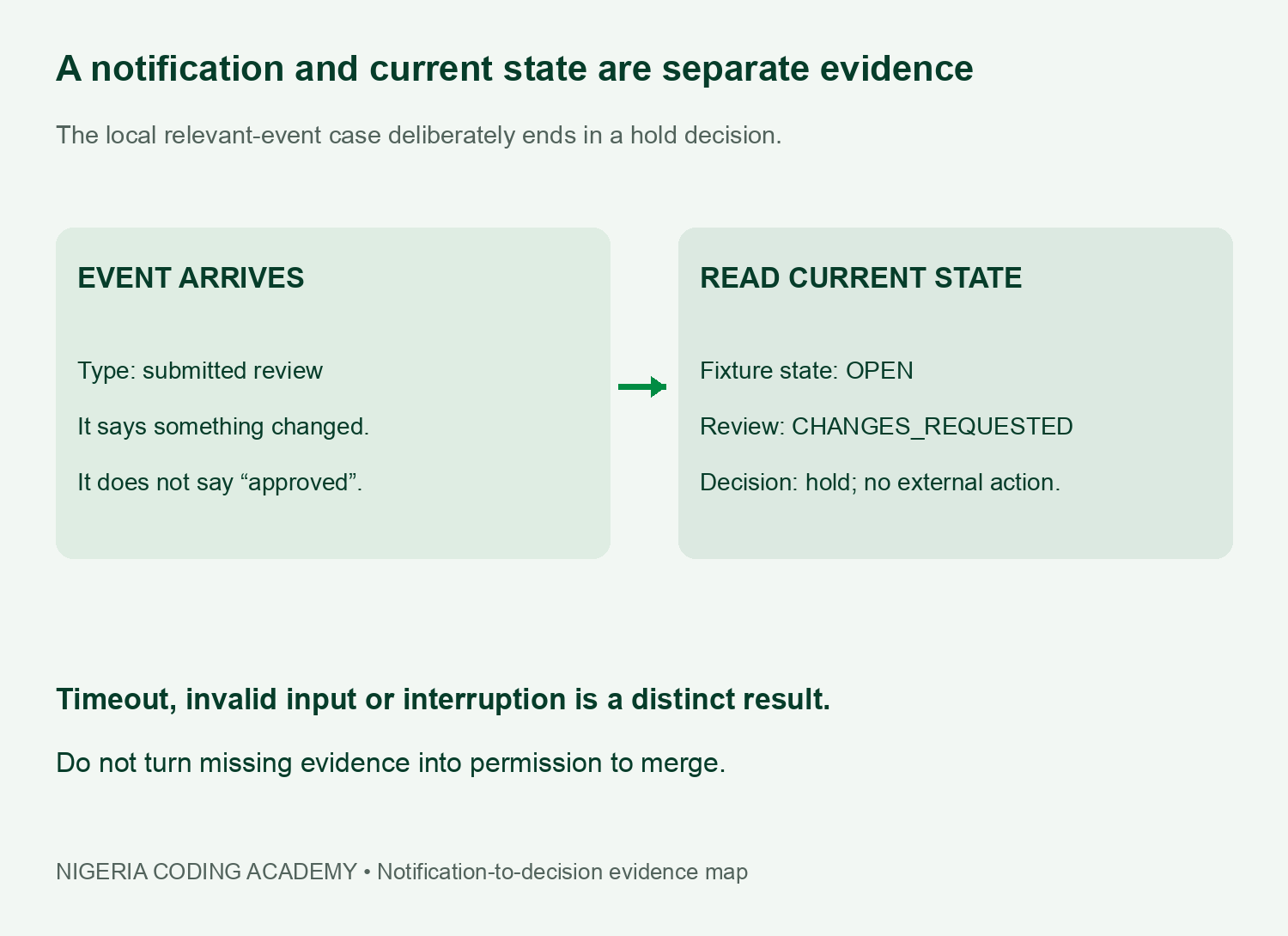
A submitted review can request changes, comment or approve. Therefore, a notification that a review exists cannot by itself answer whether your intended condition is met. Our relevant-event fixture deliberately pairs a submitted-review notification with a separate current-state file that says changes are requested.
The receiver records a hold decision after reading that state. It does not merge anything or call GitHub. This is an intentionally narrow example of a broader evidence habit: identify the condition you need, decide which notification should trigger a fresh check, and keep the check’s result separate from the notification itself.
Make the polling arithmetic explicit
For a 600-second window, we schedule queries at each interval through the endpoint: five, ten and so on through 600 for the five-second schedule. There is no request at time zero. The counts are 600 divided by five, fifteen or sixty: 120, 40 and 10 respectively.
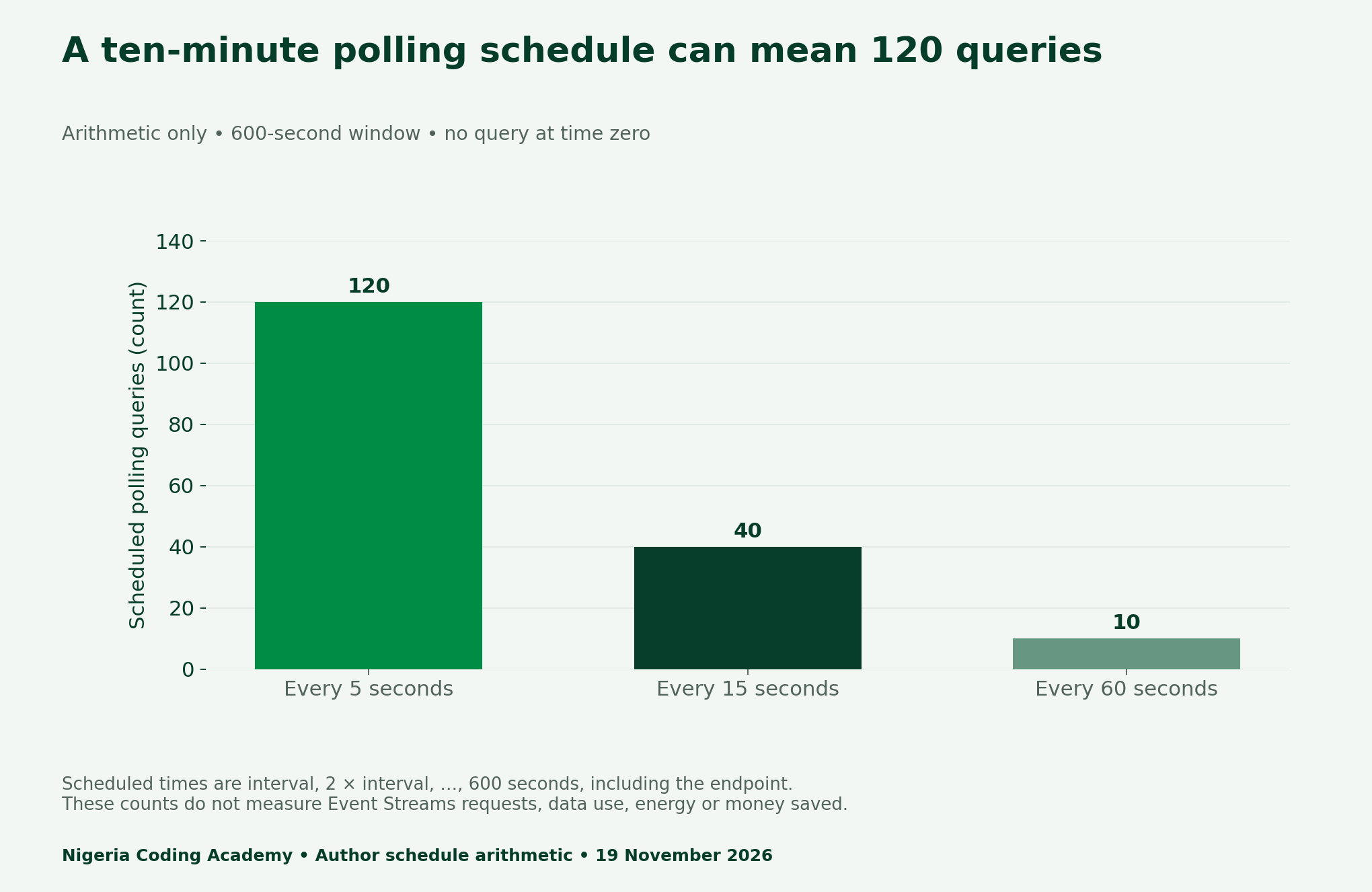
In addition, changing the counting convention changes the result. If you add an initial query at time zero, each schedule gains one request. Consequently, the CSV records the first and last scheduled query and whether you include the starting instant. Do not hide an endpoint assumption inside a headline.
Run six local GitHub CLI event streams learning cases
The downloadable Python harness reads synthetic event lines with virtual timestamps. It uses a separate JSON file when a relevant unique event asks for a current-state check. The deadline is a value of 600 virtual seconds; the script does not sleep for ten minutes or open a stream.
For example, we designed a matching review event, an irrelevant head-change event, no event, a duplicate event, invalid JSON and a local interruption marker. Next, each case has an expected local outcome that the script checks. Successful assertions mean the teaching harness produced those expected outcomes, not that the real preview passed six integration tests.
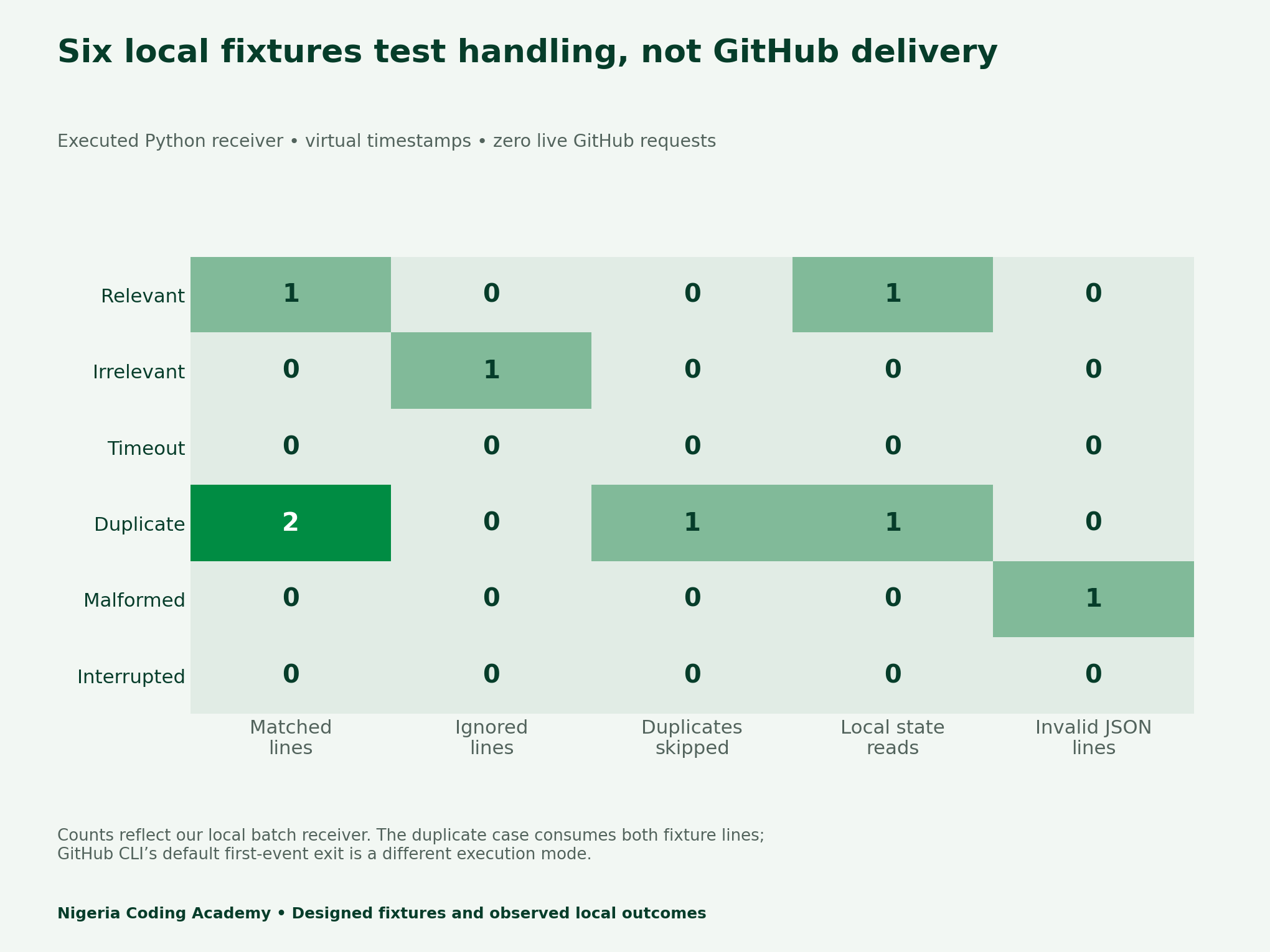
| Case | Observed local result | What it supports |
|---|---|---|
| Relevant event | State read; hold | Review arrival does not imply approval |
| Irrelevant event | Ignored; virtual timeout | Unrelated type does not satisfy the wait |
| No event | Virtual timeout | No evidence remains a distinct result |
| Duplicate ID | One duplicate skipped; one state read | Our local deduplication rule works on this fixture |
| Malformed line | Invalid-input result | Bad JSON is not treated as a valid notification |
| Interruption marker | Recheck-required result | A disconnection signal does not become success |
Treat the timeout and interruption as real branches
Our irrelevant-event and no-event cases both reach the virtual deadline without a relevant state check. They remain timeout outcomes. The invalid JSON case stops with a validation result, while the local disconnection marker stops with a recheck-required result. None is converted into a green light for a repository change.
For a Nigerian learner working around an unreliable connection, the local cases provide a way to practise error handling without repeatedly contacting a live endpoint. They do not measure Nigerian connectivity, outage frequency or data costs. Instead, measuring those outcomes would require a different study with an explicit sample and consent where relevant.
Read the current state after attaching and after relevant changes
The CLI listen manual describes thin events that point to the changed resource. It does not replay earlier events. Therefore, it directs readers to check current state once it confirms attachment. A completed check suite also does not automatically mean every pull-request check has finished.
However, keep that documented behaviour separate from our model. The harness does not implement the real attachment handshake, authentication, reconnection protocol or subscription lifetime. It demonstrates a local state-read decision only. We make no delivery-order, exactly-once or replay guarantee, and we do not infer one from duplicate handling.
A useful wait ledger records the resource, desired state, relevant types, attachment time, deadline, event identifier and fresh-state evidence. After an interruption, preserve the reason and re-establish the state deliberately. Avoid a script that silently treats a closed connection as a completed review.
Unlock Your Unique Tech Path
Get expert tech consulting tailored just for you. Receive personalized advice and solutions within 1-3 business days.
Get StartedDownload the fixtures, results and reusable ledger
- Six observed local receiver outcomes (CSV)
- Ten-minute polling arithmetic and boundaries (CSV)
- Fixture purposes and expected outcomes (CSV)
- Blank bounded-wait and state-check ledger (CSV)
- Python harness, local events, state files and instructions (ZIP)
Use the lab without overstating its findings
Read the runner before executing it with Python 3. It uses only the standard library and never fetches the example URL inside an event. The malformed case covers a syntax error, not every possible schema error. The interruption case is a local control marker, not a real network-failure experiment.
For related evidence practice, see our local JSON testing guide and repository monitoring-state audit. Keep documented product behaviour, designed inputs and observed local results in separate records. That makes a small automation lesson reproducible and honest.


