




Offline lesson draft shared device testing should distinguish local recovery from server submission. A learner can see a restored draft without the application having sent it anywhere. On a shared phone, the next person should also not inherit the previous learner’s visible text merely because both use the same device.
Our small teaching fixture explores that distinction with two fictional learners and one invented marker. Six browser checks confirmed the authored interface’s intended behavior. The connection flag and acknowledgement are simulated in client-side code. This is not a real offline transport test, authentication test, child-data deployment or privacy/security validation.
Why the Nigerian strategy makes this a useful design question
The 17 November 2026 federal announcement launched the National EdTech Strategy. Its strategy document describes five pillars and prioritises shared access, low bandwidth and supported offline resources. It recommends a six-state demonstration cohort, one state per geopolitical zone. A recommendation does not establish that the cohort has launched.
Those policy priorities motivate the question; they do not mandate our storage design or endorse this prototype. We make no claim that the fixture is part of a government system. The exercise is for a student development team deciding how to label and inspect draft states before attempting a real deployment.
Define what “saved” means in the prototype
The fixture has one draft field, a selector for Learner A or Learner B, a local-save button and a simulated connection checkbox. Its browser storage uses separate fictional keys for the two learners. A final button creates a mock acknowledgement string. No real server receives the lesson text, and no credentials or personal records are entered.
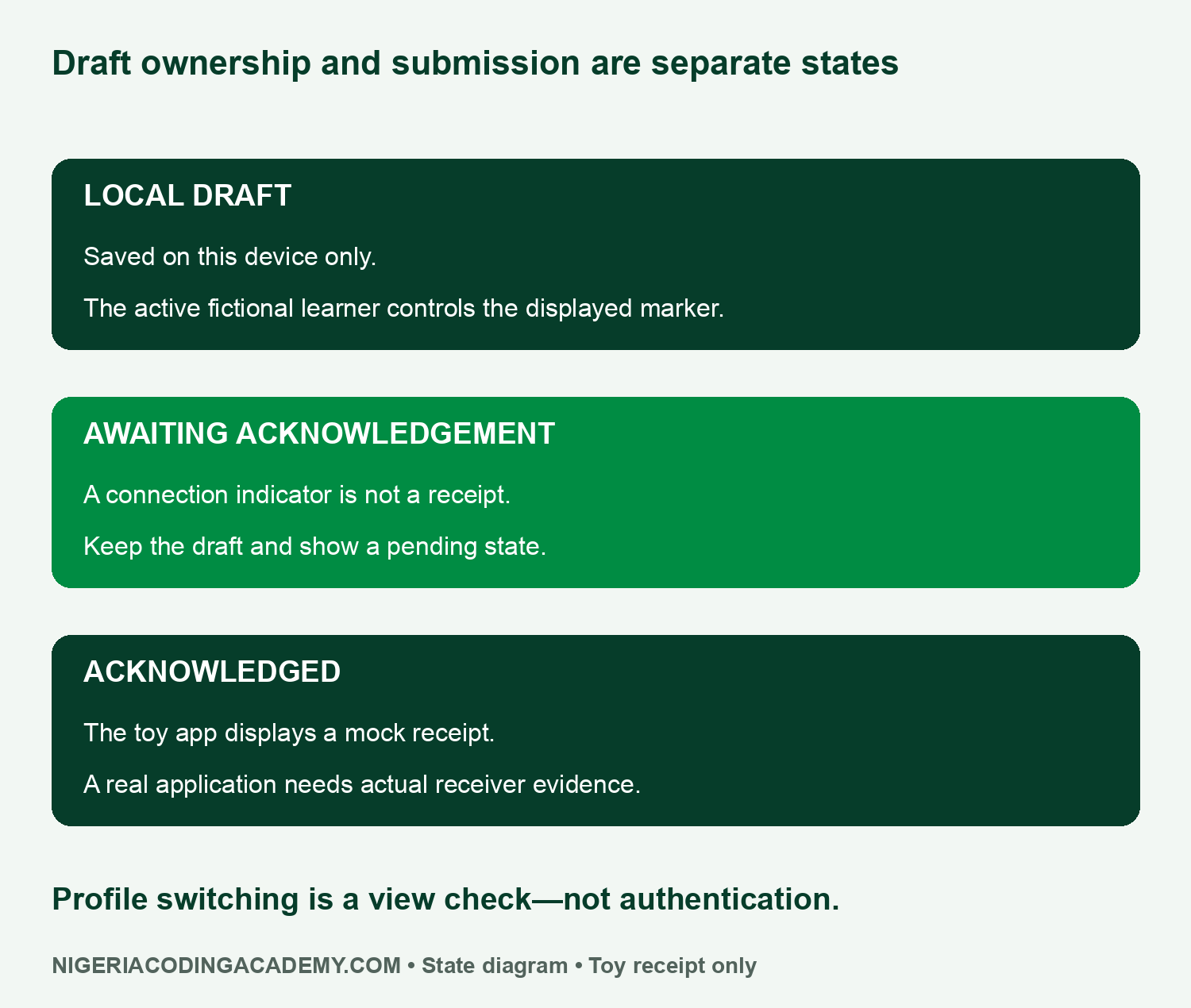
The marker is deliberately harmless: Fictional A: green triangle. The local status says “Saved on this device only” after the save. The simulated connection flag can then change the message to awaiting acknowledgement. Only the mock button creates the final “Submitted to mock receiver” label.
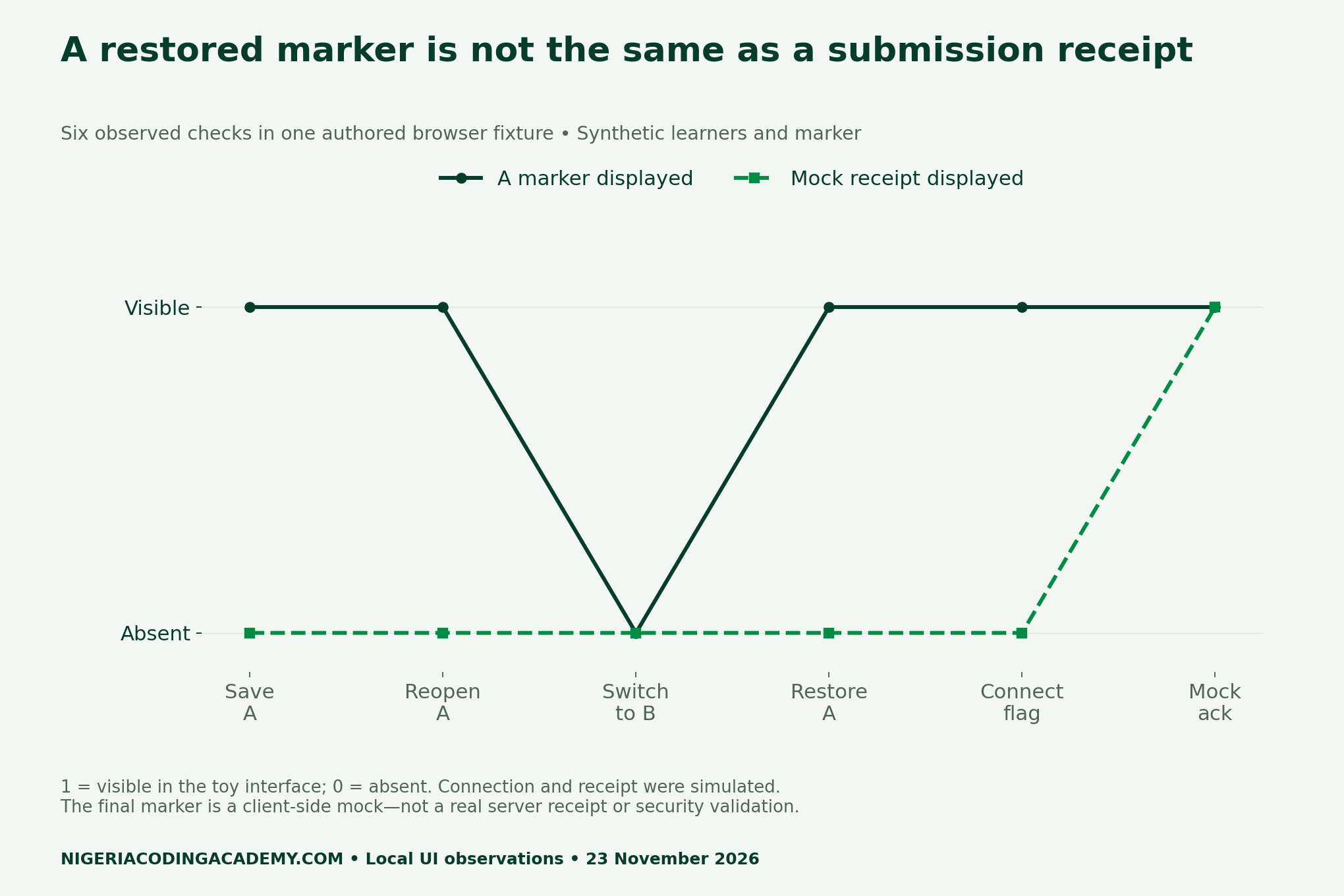
Offline lesson draft shared device testing: six observed checks
| Check | Active learner | Visible marker | Displayed result |
|---|---|---|---|
| 1. Save with offline flag | A | A marker | Saved on this device only |
| 2. Reload same learner | A | A marker | Saved on this device only |
| 3. Switch profile | B | Blank | No saved draft for this learner |
| 4. Restore profile | A | A marker | Saved on this device only |
| 5. Connect flag, before ack | A | A marker | Awaiting mock acknowledgement |
| 6. Record mock acknowledgement | A | A marker | MOCK-A-1 shown |
First we saved A’s invented marker with the connection flag off. After reloading the page, A’s text reappeared and the local-only label remained. This checks recovery through this fixture’s chosen browser-storage path. It does not guarantee recovery after storage deletion, device loss, browser eviction or an application update.
Next we switched to B. The field was blank and the interface reported no draft for that fictional learner. Switching back to A restored A’s marker. This is an observed view-filtering behavior in our toy code. Both stored drafts remain accessible to code running in the same browser origin, so a selector is not an authentication or access-control boundary.
Reconnection is not acknowledgement
For the fifth check, we enabled the simulated connection flag but did not press the mock acknowledgement button. A’s marker stayed visible and the status remained pending. The fixture did not claim submission merely because a connection indicator changed. In a real application, an online indicator alone is not proof that the intended receiver accepted a particular draft.
For the final check, we pressed the mock acknowledgement button once. The interface displayed MOCK-A-1 and disabled that button for the acknowledged toy state. That confirms a local state transition only. It does not demonstrate an actual server response, durable backend storage, retry handling or duplicate-safe delivery.
Decide what to retain before adding a sync feature
Write the intended owner, visible text, persistence location, network condition and acknowledgement evidence into separate fields. A design review can then ask what should survive a same-person reopen, what another person should see, and what happens before confirmation. Avoid a single ambiguous “Saved” message that could mean either local recovery or completed submission.
Also decide how a person removes a local draft or ends a session. This toy fixture is intentionally incomplete: it contains no secure sign-in, encryption, retention policy, service worker, production sync or authorization enforcement. Do not enter real learner information. The exercise helps identify questions for a proper design and security review; it does not answer them all.
For a future real-network test, keep its observations separate from our simulated checks. Record the actual offline condition, reconnect behavior, request identity and receiver response. Include failed acknowledgements and retries instead of showing only a successful path. Do not rename a planned case as a completed test when no relevant observation exists.
Our upload fixture demonstrates why receiver bytes and confirmation deserve separate evidence. The browser fallback exercise also separates the selected branch from the one actually tested. Apply the same habit to draft recovery and submission.
Method, fixture and four downloadable worksheets
Research checked 23 November 2026. We read the official policy context and ran the six listed interface checks in desktop Chrome through a loopback-only local server. The fixture-displayed user agent reported Chrome 157.0.0.0; we did not capture a full build number. The original observations retain the marker, owner, status and simulated flag for each check.
Unlock Your Unique Tech Path
Get expert tech consulting tailored just for you. Receive personalized advice and solutions within 1-3 business days.
Get StartedThe ZIP contains the HTML fixture, captured observations and a short local-run guide. All examples use synthetic text. Run it only as a disposable teaching exercise, and keep a real offline-network test or security assessment in a separate record. The downloadable blank checklist deliberately leaves those unperformed observations empty.
- Six observed synthetic draft-interface checks (CSV)
- Blank shared-device draft test checklist (CSV)
- Local, pending and mock-receipt status dictionary (CSV)
- Primary-source and claim register (CSV)
- Synthetic draft fixture and observed results (ZIP)
Suggested citation: Nigeria Coding Academy, “Offline Lesson Drafts on Shared Phones: What Should Survive?”, 23 November 2026. Credit the federal sources for policy context and this report for the authored fixture and limited UI observations.


