




A Kotlin TestFlight beta handover checklist should name the build, audience and evidence before a team calls an app delivered. A simulator video, an upload receipt, an internal installation and an external review submission are different milestones. None automatically establishes public App Store availability.
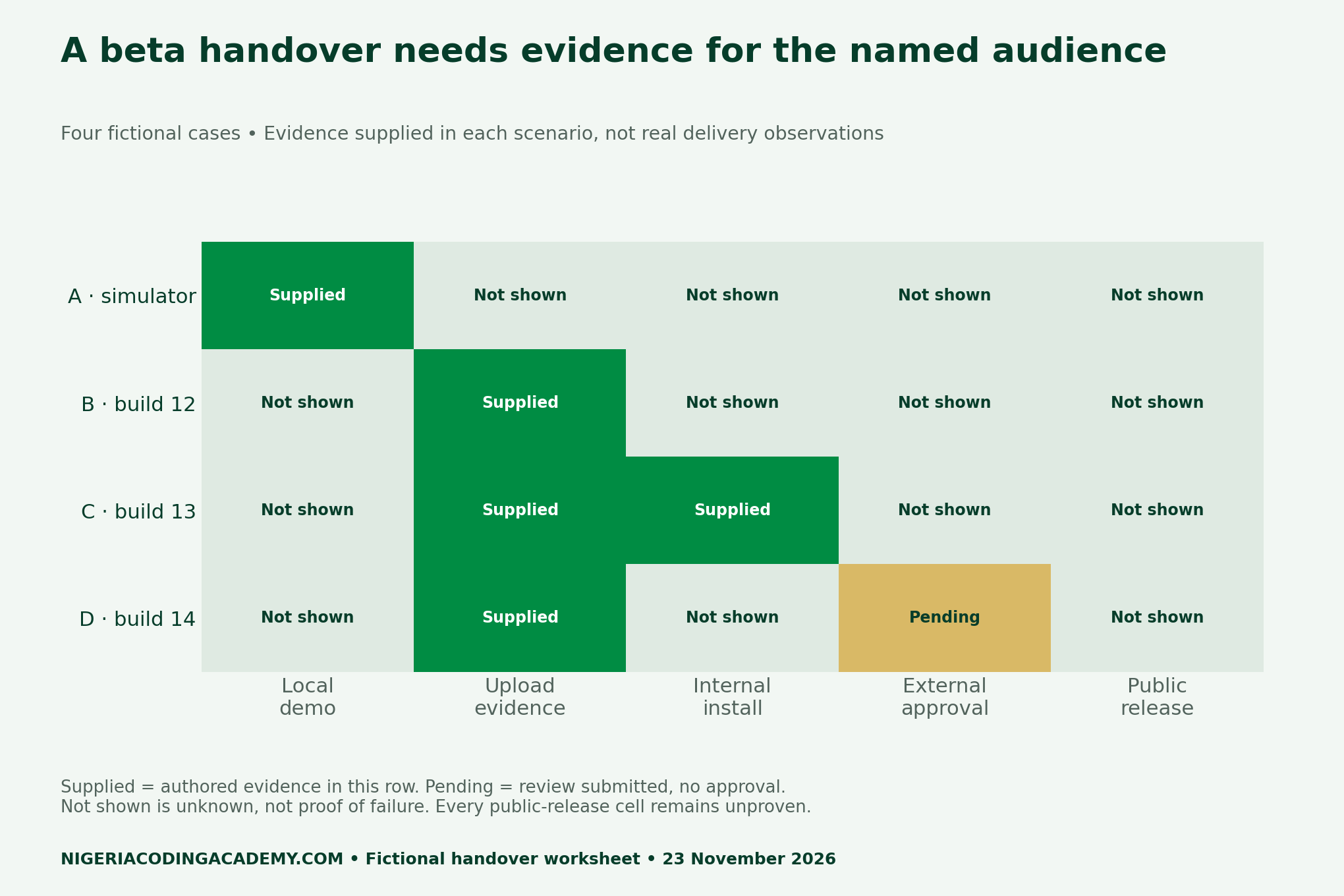
Our four-row scorecard uses fictional handovers to make those boundaries clear. No Apple account, private key, build upload or tester installation was used for this report. The worksheet is a planning and communication tool for Nigerian learners and small app teams, not an observed release benchmark or a guaranteed delivery timetable.
What the Kotlin publishing preview adds
The 16 November 2026 Kotlin Toolchain 0.14.0 release lists iOS publishing support as a preview. The vendor overview introduces kotlin publish testflight as a guided route to App Store Connect and TestFlight. A simpler command does not remove Apple’s build, audience or review gates.
As checked on 23 November, the official release index already lists 0.14.1, released on 19 November. Here, 0.14.0 identifies the feature’s introduction, not the latest patch to install. Check the current release notes and your team’s approved toolchain before planning a real run.
The current iOS publishing guide requires a Mac with Xcode and Apple Developer Program membership. Its preview flow uses automatic signing and team-side API access with an Admin role for automatic provisioning. More complex or manual-signing workflows have a separate route. Our worksheet records responsible roles; it never asks you to paste a key or credential.
Kotlin TestFlight beta handover checklist: four fictional cases
| Case | Build | Evidence supplied in the scenario | Claim that remains unsupported |
|---|---|---|---|
| A | None | Local simulator video | Uploaded or installed beta |
| B | 12 | Upload receipt; processing status | Tester installation |
| C | 13 | Eligible internal tester installation | External beta approval or public release |
| D | 14 | External review submitted; pending | External approval or public release |
Case A gives a teammate a simulator recording. That can demonstrate the local behavior shown in the recording, with its own environment limits. It does not identify a processed App Store Connect build or prove that any tester received the app. A clear handover says local demo recorded and lists the next build step separately.
Case B says build 12 was uploaded and remains processing. Keep the upload evidence and processing state together. Do not convert an uploader’s finished command into a tester’s installation. The next task is to verify the resulting build state and eligibility, not to tell a client that the beta is already in their hands.
Installation and review need separate evidence
Case C supplies fictional installation evidence for build 13 from an eligible internal tester. Record that exact version, build and audience. This supports the internal-installation milestone in the scenario. It does not establish external-group approval or that the app is publicly available. Keep feedback and remaining audience gates in their own fields.
Case D says build 14 was submitted for external review and the outcome is still pending. Its later build number does not prove that a tester installed that build, or that the review will finish by a particular date. Report the pending gate and the person responsible for checking it. Preserve an unknown outcome as unknown.
Keep internal and external audiences distinct
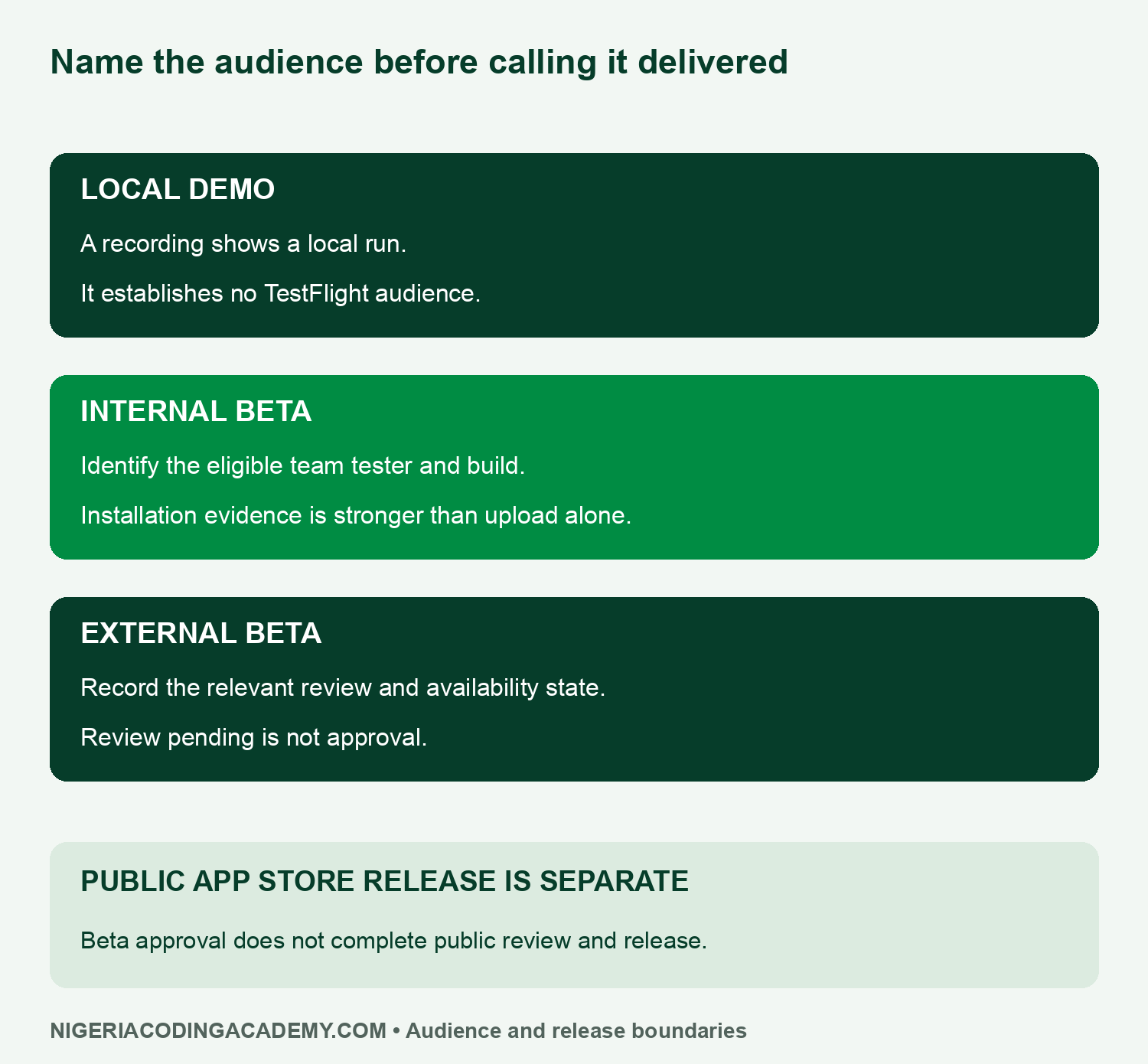
Apple’s TestFlight guidance distinguishes eligible internal team members from external beta testers. An internal group is not simply any client contact. Before describing an internal handover, check that the intended person belongs to the eligible audience and that the identified build is actually available to them.
For external testing, Apple’s external-tester guide describes group setup and review. The first build submitted requires a full TestFlight review; later builds for the same version might not. Submitted, approved, notified and installed remain separate states. The guide also identifies the account roles allowed to manage that process.
Use the exact build, not a vague “latest app” label
Apple’s build-status reference separates processing and testing-related states. Copy the relevant observed status into your own ledger with its date and build identifier. A screenshot or note about one build should not quietly become evidence for a different build uploaded later.
The four fictional rows deliberately use different evidence. They are not a longitudinal record of one app moving through a complete release. For example, the build 14 row does not supply internal-installation evidence simply because the build 13 row contains it. This prevents a tidy progress narrative from outrunning what the record actually shows.
A useful client update can be concrete without promising the next gate: “Build 12 uploaded; processing outcome pending” or “Build 13 installed by an eligible internal tester; external availability not established.” Replace those invented numbers with your own verified identifiers when using the ledger. Keep API keys, private links and personal tester details out of public evidence.
Separate a beta milestone from public release
TestFlight beta approval concerns a testing audience. It does not by itself complete public App Review, release selection or public availability. Keep the public-release column unresolved until there is relevant evidence for that claim. A public beta invitation link is still a testing route, not proof of an App Store release.
Unlock Your Unique Tech Path
Get expert tech consulting tailored just for you. Receive personalized advice and solutions within 1-3 business days.
Get StartedFor a Nigerian training cohort or small client team, the practical benefit is a more honest milestone conversation. Agree on what evidence the recipient needs to review. A recording may suit a demo checkpoint; an installed build is a different deliverable. Do not turn an unfamiliar platform status into a completion percentage or a promised review duration.
Our lesson-draft state exercise makes a related distinction between local recovery and acknowledgement. The PHP debugger evidence guide likewise separates a connection from the file and branch actually observed. A handover needs the same precision about what happened.
Method, limitations and four CSV tools
Research checked 23 November 2026. We compared official Kotlin release notes and the current publishing guide with Apple’s TestFlight and build-status documentation. We then authored four fictional records and classified only the evidence supplied in each row. No publisher account or development-team credential was accessed, and no release command was executed.
The CSV tools preserve fictional case facts, blank handover fields, claim boundaries and source links. They measure no success rate, review time, cost or Nigerian app-team population. The chart is a scenario scorecard. Its unresolved cells should remain unresolved until a separate real-world observation supports a stronger claim.
- Four fictional beta handover cases (CSV)
- Blank version, build and audience handover ledger (CSV)
- Evidence needed for each delivery claim (CSV)
- Primary-source and claim register (CSV)
Suggested citation: Nigeria Coding Academy, “Kotlin to TestFlight: What Has Your Team Actually Delivered?”, 23 November 2026. Credit JetBrains and Apple for their tool and platform documentation, and this report for the fictional handover worksheet.


