




GitHub Actions has announced two pull_request_target brownout windows. In Nigeria, both run from 17:00 to 19:00 WAT, on 9 and 16 November 2026. A maintainer who sees a failed run during those windows needs to establish whether a policy blocked execution before investigating project code.
This read-only guide provides a Nigerian-time calendar, six fictional repository cases and a blank audit ledger. It helps you gather evidence and document an owner decision. We have not audited a live repository, changed a policy or executed untrusted fork code.
GitHub Actions pull_request_target brownout Nigeria schedule
GitHub’s 2 November announcement schedules two temporary enforcement windows. We checked the notice on 7 November. These are announced plans, not observed downtime; check the official page again before each window.
| Announced date | UTC | Nigeria: WAT | Duration |
|---|---|---|---|
| 9 November 2026 | 16:00–18:00 | 17:00–19:00 | 120 minutes |
| 16 November 2026 | 16:00–18:00 | 17:00–19:00 | 120 minutes |
WAT is UTC plus one hour. Adding that offset changes the clock labels, not the length of either window. Keep the date and zone together when sharing the calendar with a study group whose members live elsewhere.
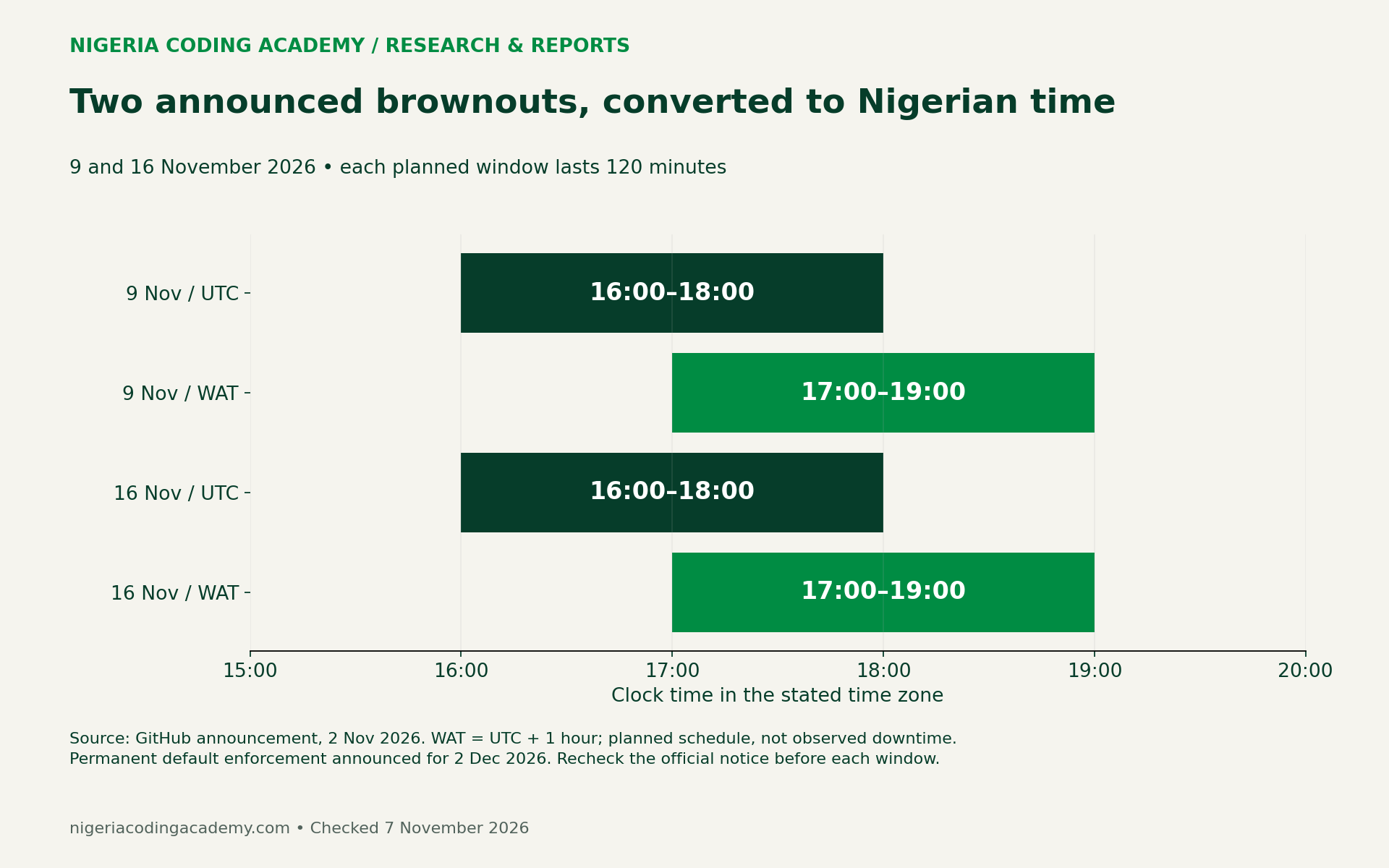
The notice places permanent default enforcement on 2 December 2026, moved from 2 November. During a brownout, blocked attempts create failed runs with annotations but do not execute. After each temporary window, the rule returns to evaluate mode.
First establish whether the announcement covers the repository
The announced default change covers public repositories on GitHub Free, Team and Enterprise Cloud, unless an applicable Actions event policy explicitly allows the event. Private/internal repositories and GitHub Enterprise Server are outside this announcement’s scope. Being outside scope is not a general security clearance.
Record the repository’s actual visibility and hosting product. For example, “public” describes visibility; “Enterprise Server” describes hosting. Do not use one field as a substitute for the other. Also record the observation date because a repository can change visibility or move between products.
Next, identify the relevant workflow path and trigger. A text search is a useful starting point, but a match can occur in comments, examples or inactive files. Retain enough surrounding context to explain why a finding matters without copying secrets or unrelated private information.
Six fictional cases make the scope check inspectable
Our original fixture pack contains six metadata cases. They are deliberately chosen teaching examples, not a sample of Nigerian repositories or the output of GitHub’s policy engine. Their labels describe how to reason about the announcement.
| Case | Fictional setup | Audit interpretation |
|---|---|---|
| C01 | Public, GitHub Free, target trigger, default policy | Investigate the announced default block |
| C02 | Public, GitHub Team, target trigger, applicable scoped allowance | Review the exception’s scope and every other applicable protection |
| C03 | Public, Enterprise Cloud, pull_request trigger only | No matching target trigger in this fixture |
| C04 | Private repository | Control outside the announced default change |
| C05 | Internal repository | Control outside the announced default change |
| C06 | Public repository on Enterprise Server | Hosting control outside this announcement |
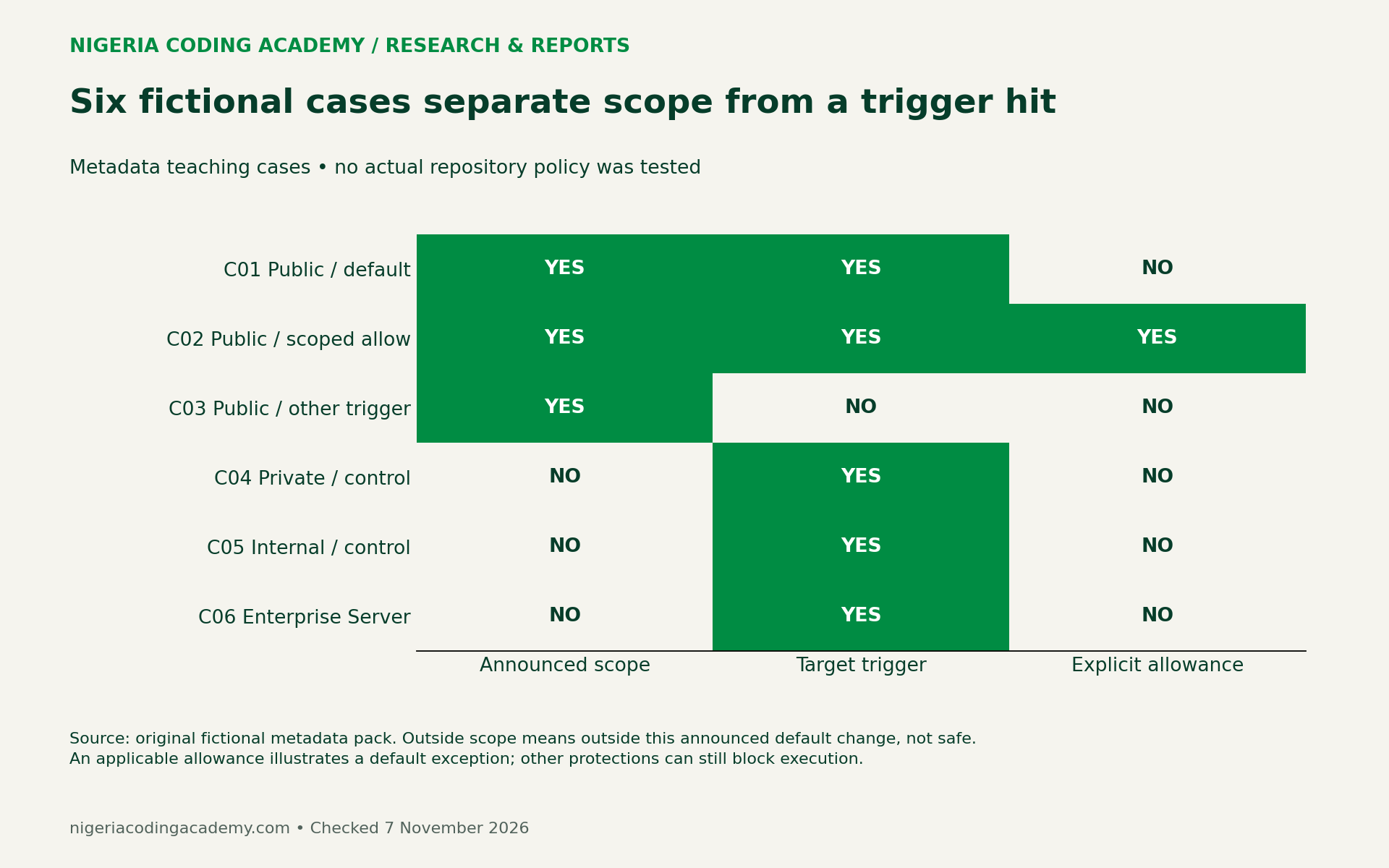
C01 and C02 illustrate why the same trigger can require different follow-up. C03 illustrates why visibility alone is insufficient. Finally, the three scope controls prevent a reader from treating the announcement as a rule for every GitHub deployment.
Do not turn the case counts into a prevalence estimate. Three controls among six chosen examples does not mean that half of real projects fall outside scope. We selected examples to cover distinct reasoning paths, not to represent a population.
Separate four facts before diagnosing a failed run
Keep four questions in separate ledger fields: does a workflow mention the trigger, did an event occur, did a policy block it, and did a job execute? Each question needs its own evidence.
A search result supports only the first question. A retained policy annotation can support the third. However, a failed-run label by itself does not tell you that application code ran and failed.
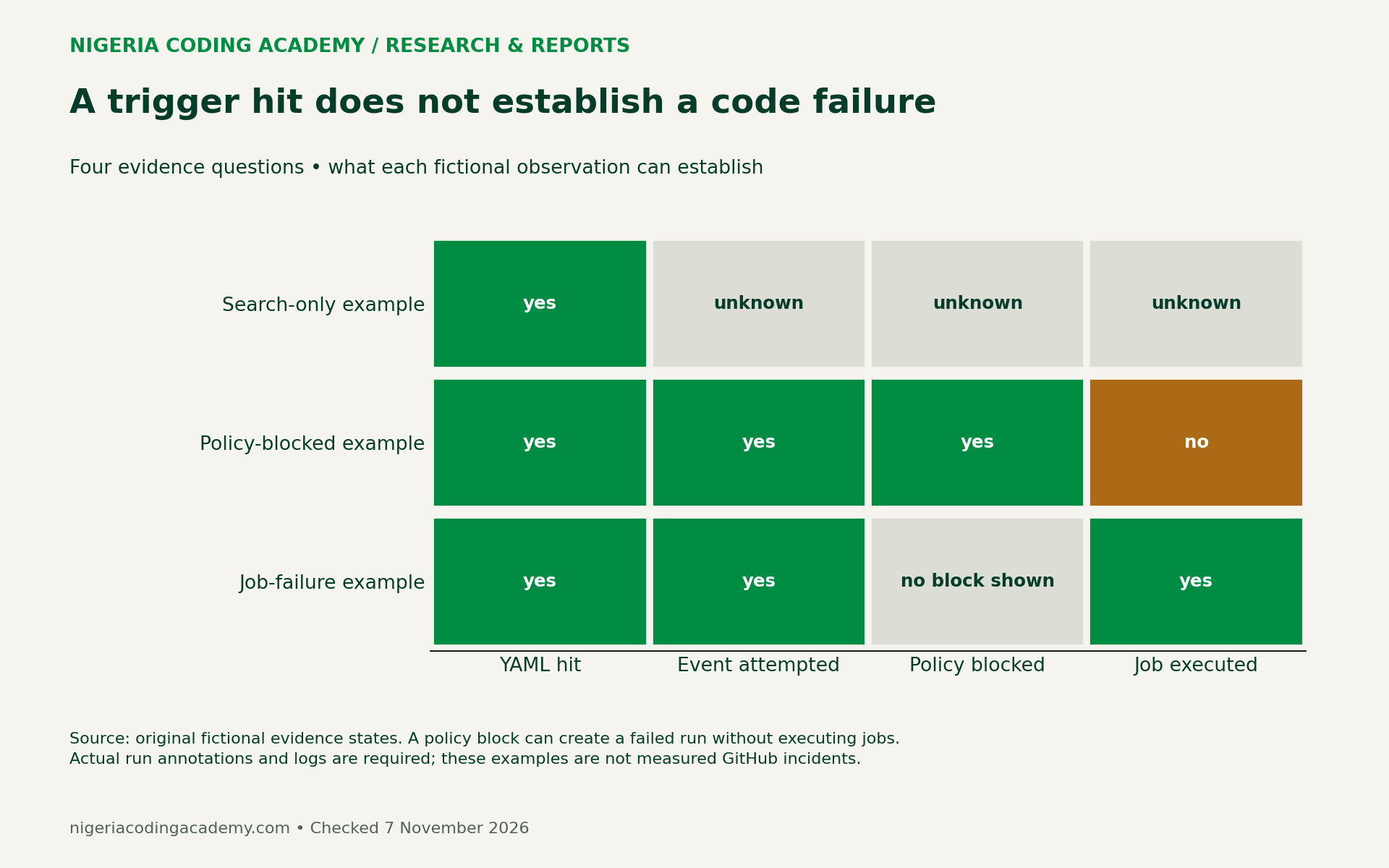
Consider this fictional annotation example: a maintainer records a failed run, a policy message identifying the target event, and no executed job. The ledger should describe a policy-blocked attempt. It should not invent a compiler error, failed assertion or application outage.
If a job did begin and fail, retain its relevant step and error instead. Dependencies, permissions, environment configuration and application code are separate possible causes. Report what the evidence establishes, then leave the remaining cause unresolved until checked.
Unlock Your Unique Tech Path
Get expert tech consulting tailored just for you. Receive personalized advice and solutions within 1-3 business days.
Get StartedFor a related lesson in separating tool-session problems from application problems, see our Firefox DevTools MCP diagnosis guide. The technologies differ, but the need to identify the failed layer is the same.
Fill in the audit ledger without exposing secrets
Use one row per repository/workflow finding. The blank CSV provides twenty rows for convenience; twenty is a template size, not a recommended research sample or an audited project count.
Record the repository label, visibility, hosting product, workflow path, trigger, event-policy scope, evaluate-mode finding, owner, decision, verification date and evidence link. An unknown value should remain unknown. Do not substitute “safe,” “never used” or “not affected” for missing evidence.
Prefer a link to an authorized run or policy observation over a copied log dump. Keep tokens, secret values, personal information and unrelated private repository details out of public worksheets. The six downloadable JSON files contain only invented metadata.
For basic project history practices, our version control and automation guide supplies background. This audit focuses on the evidence behind a specific event-policy decision, rather than replacing a general Git workflow.
Document an owner decision before changing anything
GitHub’s workflow-execution documentation explains layered protections, targeting and policy insights. Repository administrators, organization owners and enterprise owners have different scopes of responsibility. Inspect the policies that actually apply to your project rather than assuming one visible setting explains every result.
The documentation distinguishes active-policy blocks from evaluate-mode findings. It also notes that the selectable Evaluate enforcement status is an Enterprise Cloud feature. Access and interface options can therefore differ by product and role.
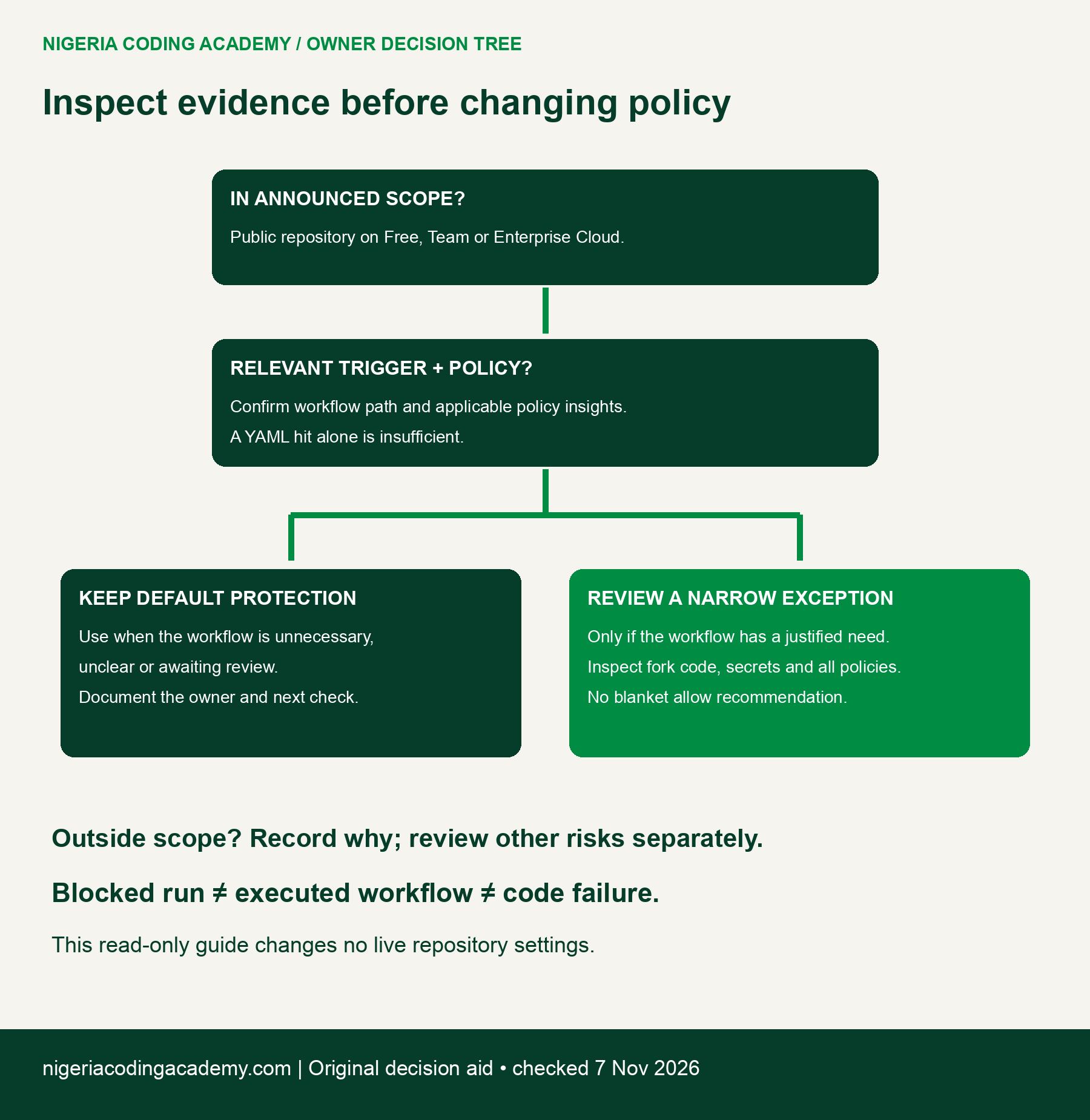
Your decision record should name the owner, explain the workflow’s purpose and identify the next evidence check. If the need is unclear, retain the default protection while seeking clarification. A deadline is not evidence that a broader permission is justified.
If an authorized owner considers a narrow exception, review the workflow’s actual behavior first. Record fork-code execution and potential secret exposure separately. This article supplies no live exception procedure and performs no security-setting changes.
Downloads, method and limits
- Announced UTC/WAT calendar (CSV) — dates, explicit offsets, durations and source.
- Six fictional repository cases (CSV) — scope, trigger, policy context and follow-up.
- Blank twenty-row audit ledger (CSV) — an unfilled worksheet, not completed audits.
- Evidence-state reference (CSV) — observations, next questions and claim limits.
Download the six fictional metadata fixtures and worksheets (ZIP). The pack contains JSON examples and CSVs, not executable GitHub workflows. Our original teaching metadata and blank worksheets are available under CC0; that does not relicense GitHub’s documentation.
We converted the official UTC schedule using a fixed UTC+1 offset and checked both durations with Python. We then constructed six explicit metadata cases and three evidence examples. No live policy evaluation, repository security assessment or brownout observation was performed.
Checked 7 November 2026. Revisit the official announcement immediately before publication and each planned window. Keep future observations separate from this dated plan, and preserve any changed schedule as a revision rather than silently rewriting past evidence.


