




A pgAdmin export encoding test should check what the receiving program reads back. An export can look successful while a later reader changes an identifier or loses a text distinction. This guide supplies 12 fictional fixtures, a transparent local rehearsal and a blank ledger for testing your actual database workflow.
Research date: 1 November 2026. We ran 12 rows through three author-configured Python serializer/parser pairs: 36 row-format comparisons. All preserved the expected values and types under those specific rules. We did not run pgAdmin, PostgreSQL or a spreadsheet. These results validate our constrained fixture rehearsal, not pgAdmin 9.19’s exports.
What changed in pgAdmin 9.19
The pgAdmin Development Team’s 31 October 2026 announcement reports 136 bug fixes and new features, including fixes for 15 security vulnerabilities. It describes Query Tool results export in CSV, JSON and XML, with selectable encoding and an optional byte order mark.
However, the versioned release notes give 29 October as the release date. Keep that date separate from the news-post date. The announcement also describes a fix involving files loaded with Latin-1 or another non-UTF-8 encoding being saved back as UTF-8. These are vendor-reported changes, not defect rates measured in Nigerian projects.
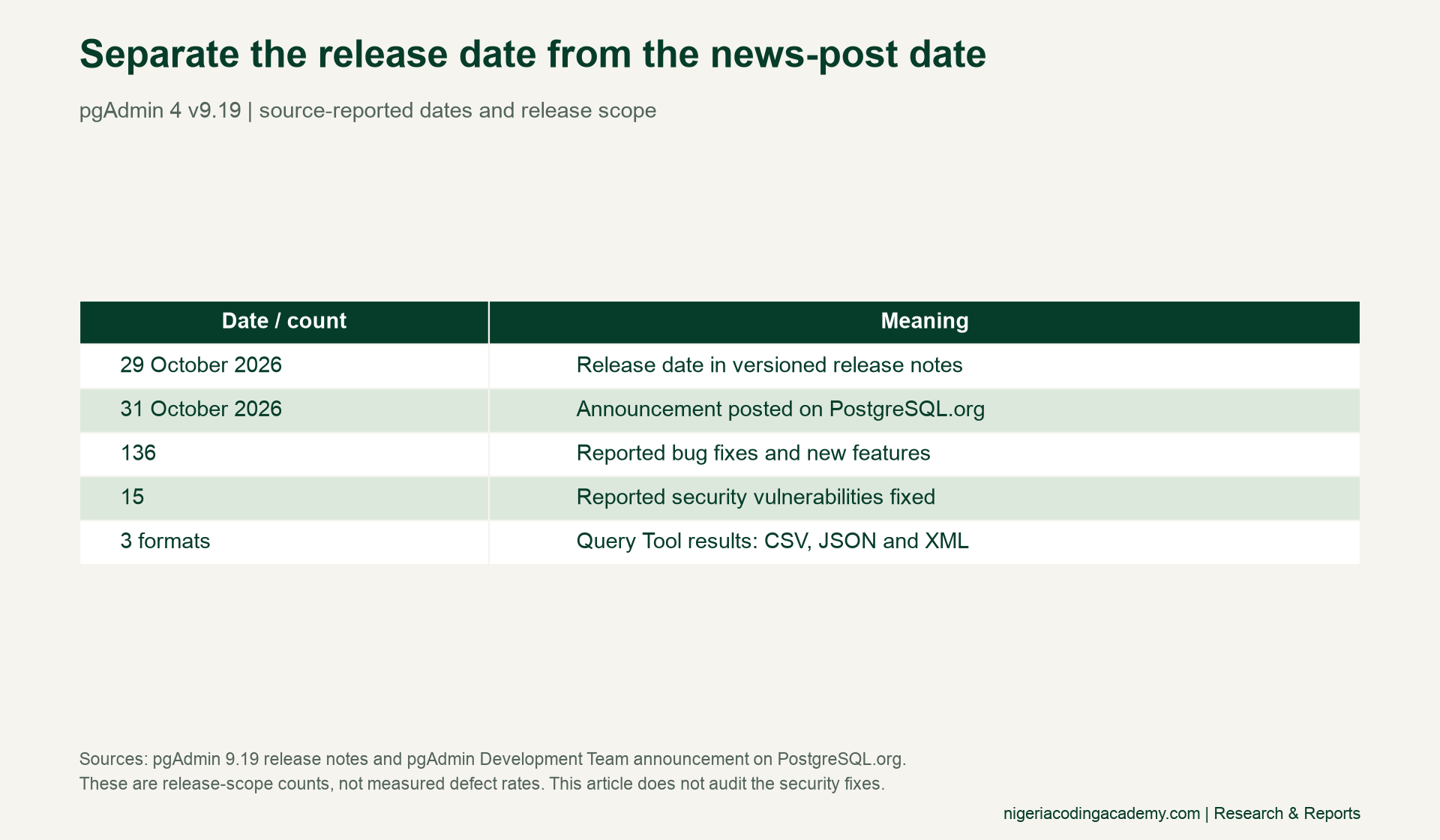
Use the official notes for the complete upgrade requirements and security guidance. Our text-preservation exercise does not audit the fixes. It instead asks a smaller question: can a named reader reconstruct the values you meant to export?
Define the pgAdmin export encoding test before running it
First, state the expected schema. A leading-zero identifier such as 001234 is text in this exercise. Converting it to a number would remove part of the intended value. Likewise, an empty string and a null value are distinct, even if both appear as blank cells in a viewer.
Next, record the exporter version, database version, format, encoding, BOM setting, null representation and reader version. Specify whether you compare exact code points or apply a named Unicode normalisation policy. These choices define the experiment; they should not be reconstructed from memory after a mismatch.
Our data-contract study explains why these assumptions belong in a shared register. For an export workflow, the contract must cover both the file writer and the program that consumes its output. “The file opened” is a much narrower observation than “the values survived.”

Use 12 fictional rows with explicit expectations
Our pack covers accented text, combining characters, the naira symbol, commas, quotation marks, a line break, leading zeros, a long text identifier, an empty string, a null proxy, surrounding whitespace and ordinary ASCII. Each case has a stable identifier, E01 through E12.
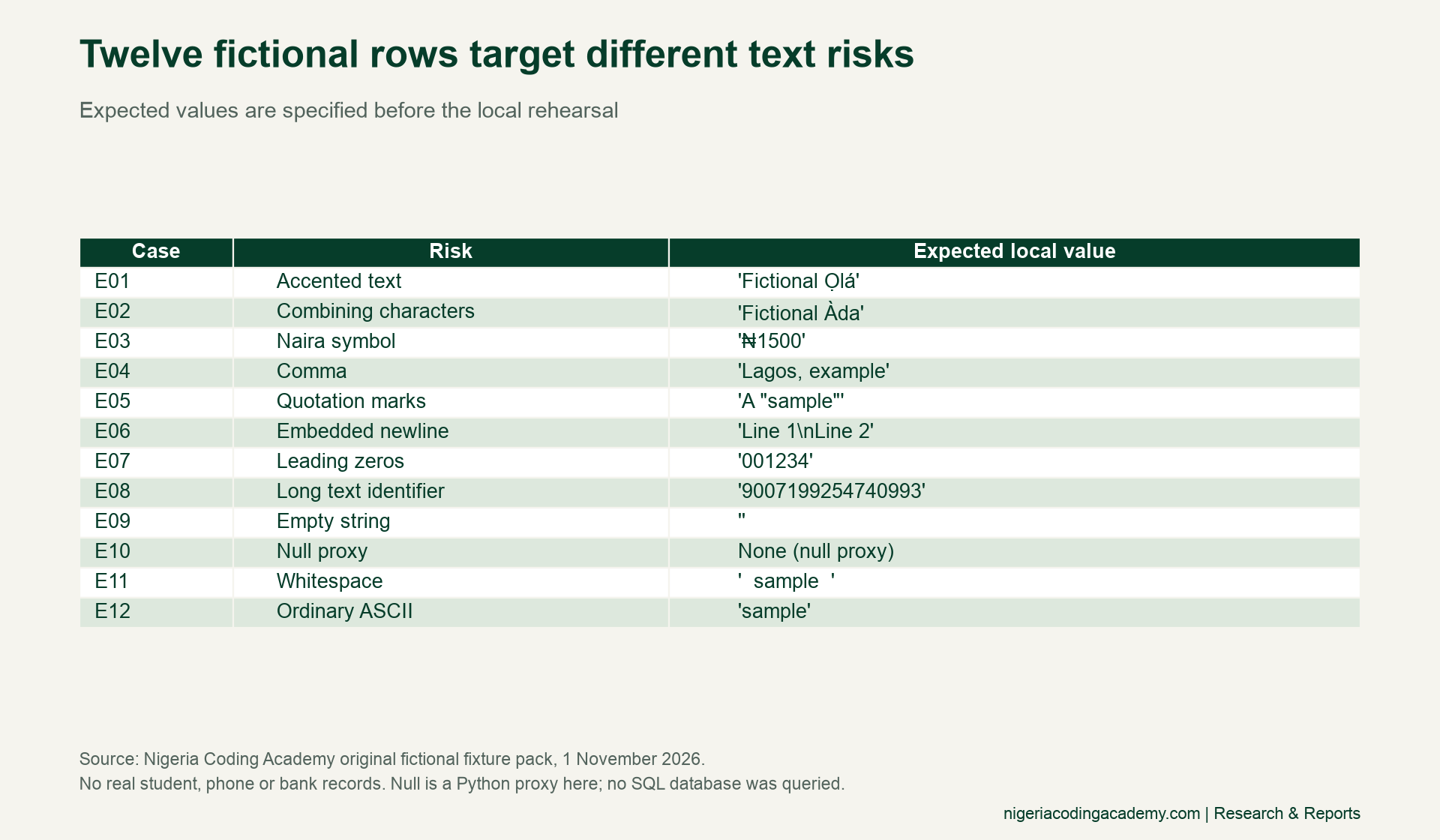
The examples are deliberately invented. “Fictional Ọlá” illustrates text handling without representing a real learner. The long string 9007199254740993 remains text. The null row uses Python’s None as a proxy; we did not retrieve SQL NULL from a database.
In the fixture CSV, expected_is_null tells you whether a blank value represents the null proxy. It is false for the empty-string case and true for the null case. Retain that flag when adapting the pack. Otherwise, the download itself could erase the distinction you want to test.
What our 36 local checks actually measured
The rehearsal used Python 3.9.6 on macOS with an arm64 processor. We wrote and read each format using Python’s standard library. All files used UTF-8 without a BOM. We applied no normalisation, trimming, case folding or numeric conversion.
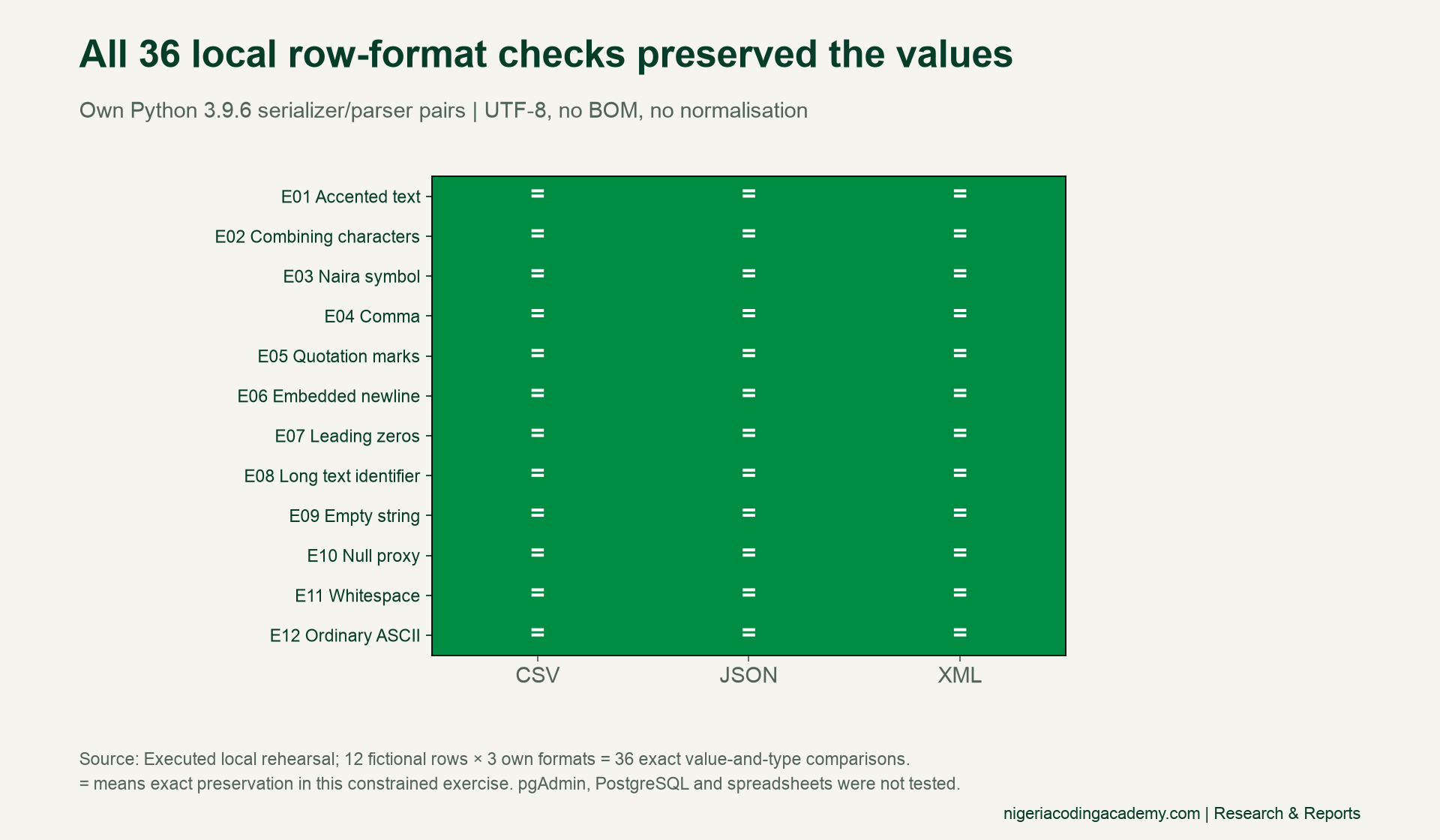
CSV used a declared \N marker for the null proxy, which the reader restored to None. A literal text value equal to that marker is not covered by these fixtures. JSON used its null representation. Our custom XML used an is_null attribute to separate null from an empty text value.
These are our own file contracts. Do not assume pgAdmin emits the same JSON structure, XML attributes or CSV null marker. The 36 passing checks show that our selected writer/reader pairs obeyed those contracts for these rows. They do not establish compatibility with an untested exporter or application.
To reproduce the rehearsal, download the complete Python script (TXT), save it as encoding_rehearsal.py in an empty working folder and run python3 encoding_rehearsal.py. It uses only the standard library and writes its fictional data, three local files and result logs into that folder. Inspect the script before running it; it needs no credentials or network access.
Unlock Your Unique Tech Path
Get expert tech consulting tailored just for you. Receive personalized advice and solutions within 1-3 business days.
Get StartedCompare reconstructed values across formats
Our local CSV file contained 387 bytes, XML 912 bytes and JSON 1,037 bytes. Each includes different headers, keys or markup. Consequently, their file hashes differ even though the selected values reconstruct exactly under our rules. These byte counts are properties of these particular files, not a universal format ranking.
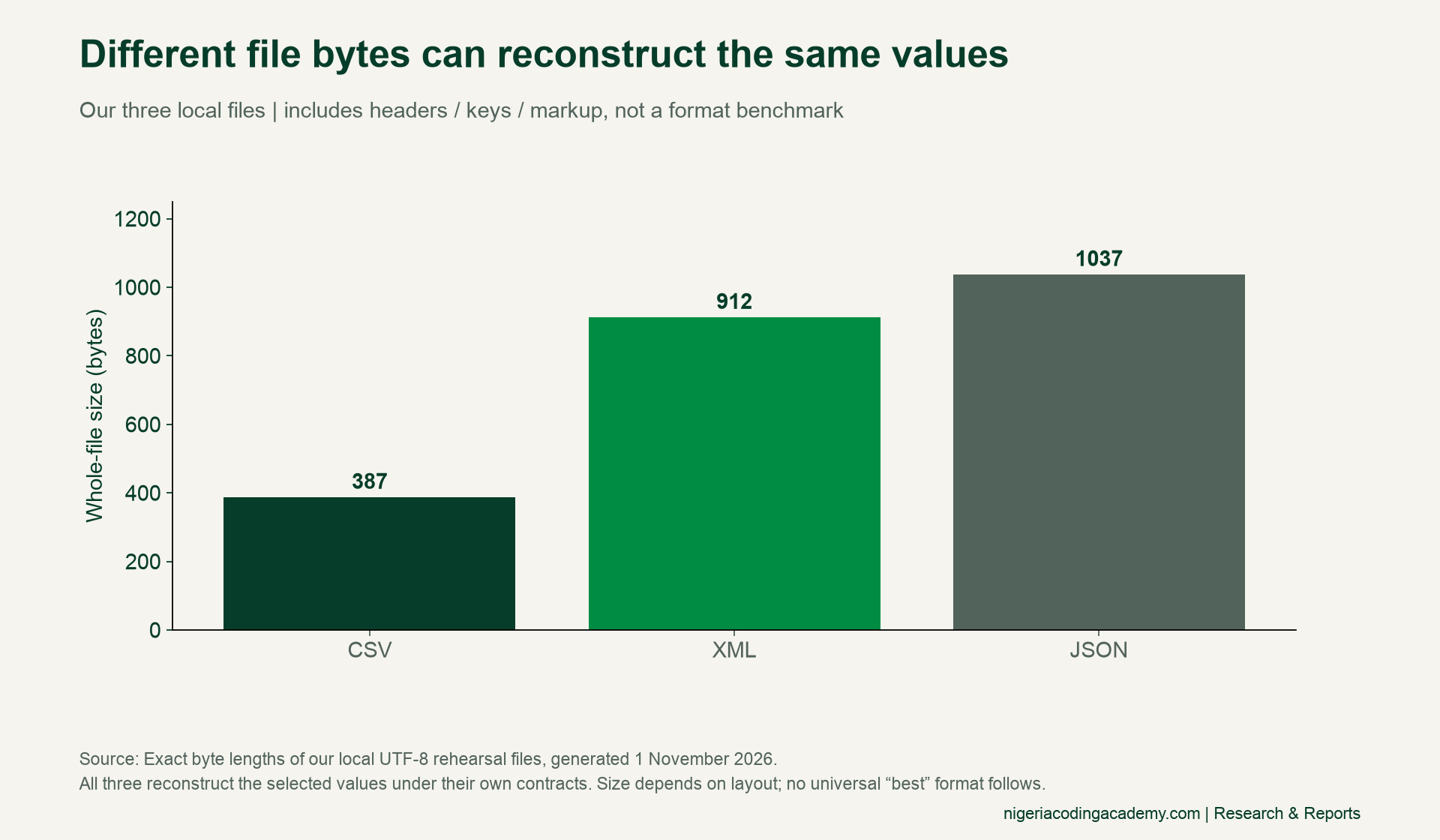
Use whole-file hashes when checking that a downloaded file matches its original. Use parsed values and expected types when comparing different export formats. These checks answer different questions. A byte-for-byte comparison between CSV and JSON would reject valid differences in representation.
For each row, compare its identifier, text value and null state. Then classify the outcome as exact preservation, an acceptable documented transformation, an unexpected transformation or a parse failure. A run that never starts remains untested. Keep the original bytes so another developer can investigate the boundary where a change occurred.
Make the Unicode comparison policy visible
One familiar accent can use different code points. In our separate Python demonstration, composed À contains one code point. The sequence A plus a combining grave accent contains two. Exact string equality is false; after applying NFC to the decomposed sequence, equality is true.
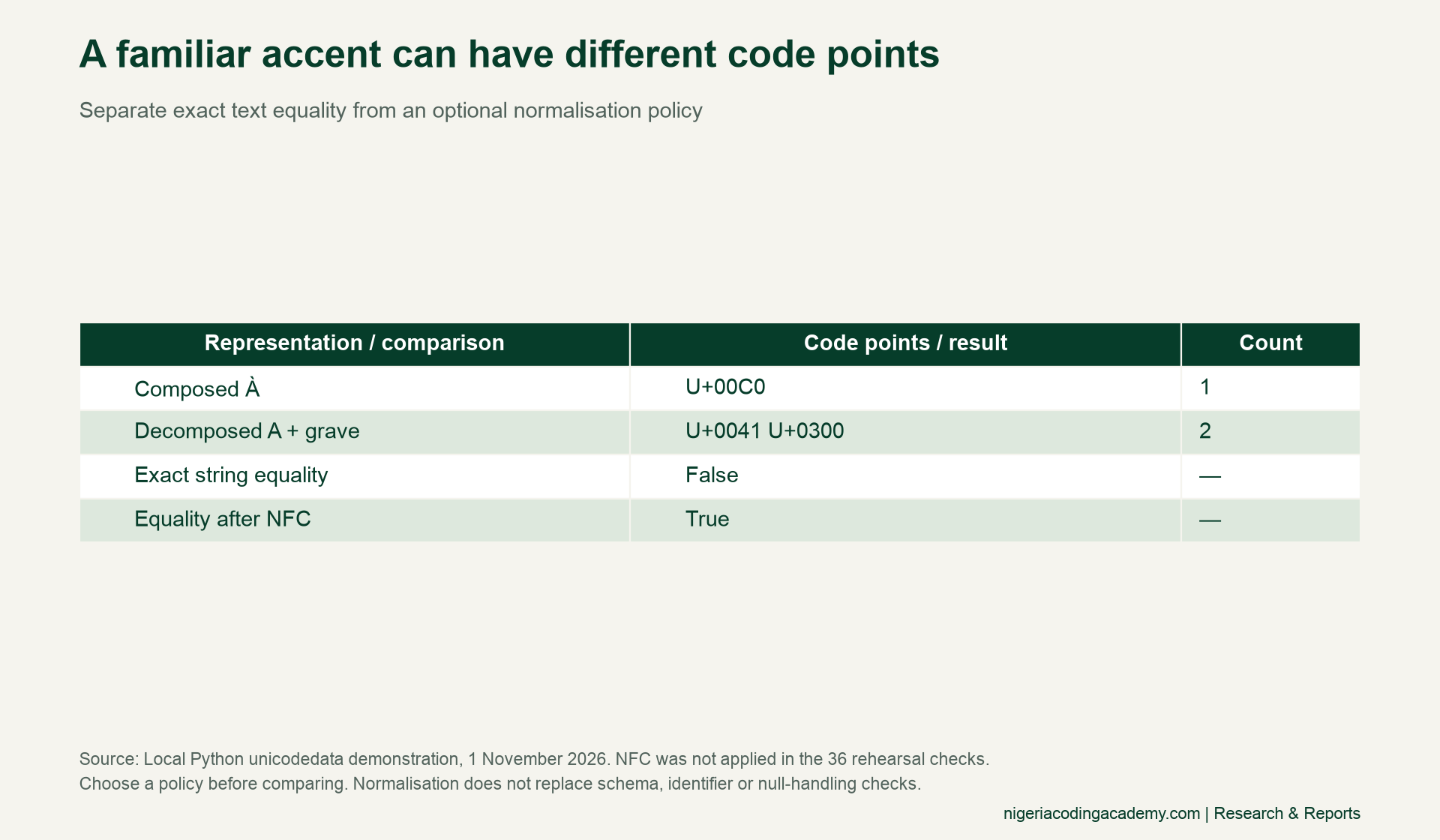
Python’s Unicode normalisation documentation explains these forms. Choose a policy that fits your data contract. We used exact equality in the 36 rehearsal observations; the NFC example is a separate demonstration. It does not retroactively change their comparison rule.
import unicodedata
composed = "\u00c0"
decomposed = "A\u0300"
print(len(composed), len(decomposed))  # 1 2
print(composed == decomposed)  # False
print(composed == unicodedata.normalize("NFC", decomposed))  # True
Run the actual pgAdmin export encoding test
The downloadable pgAdmin ledger is a proposed protocol, with 36 blank result rows. Import or construct the fictional values in a dedicated test database under your chosen schema. Verify them there first. Then use your installed Query Tool to export each supported format with the recorded settings.
Read each export with the downstream consumer you actually plan to use. Preserve its version and options too. Add BOM or alternative-encoding variants only where the writer and reader support them. Record rejected combinations instead of forcing an artificial full set of tests.
Finally, retain the output files and compare parsed values against the original fixture specification. Check the boundary at which any mismatch appears before assigning blame to pgAdmin. Our version-control guide can help retain the scripts and configuration history. No results for this proposed pgAdmin protocol are reported here.
Download the fixture pack and ledgers
- 12 fictional encoding fixtures (CSV): expected text, null flag and risk label.
- 36 local Python rehearsal observations (CSV): value checks, type checks, format and exact environment.
- Local rehearsal configurations (CSV): writer, reader, null contract, UTF-8 and BOM settings.
- Blank pgAdmin export test ledger (CSV): 36 proposed row-format checks, with all actual-result cells unfilled.
Open these files as UTF-8. Preserve identifiers as text and retain embedded line breaks and surrounding spaces. Their appearance in a spreadsheet is not itself evidence that its underlying values match. These examples describe specific risks without estimating their prevalence in Nigeria.
Methodology and limits
Our contribution is the fictional fixture specification, executed Python rehearsal, comparison rules and unfilled pgAdmin protocol. The 12 deliberately selected rows are not a representative sample. We tested three constrained local serializer/parser pairs, with no database, spreadsheet, network service or security exploit involved. No format is certified for every language or consumer.
Suggested citation: Nigeria Coding Academy, “pgAdmin 9.19 Export Testing: A UTF-8 Fixture Pack for Nigerian Names,” 1 November 2026. Identify the local Python environment when citing results. Original fictional fixtures and worksheets may be reused with attribution under CC BY 4.0. External source material retains its own terms. Featured and inside artwork is AI-generated conceptual illustration, not a pgAdmin screenshot.


