




Firefox DevTools MCP failures need evidence about the layer that failed. A connection timeout may concern session ownership or permission before an application receives any action. This guide provides a five-scenario testing protocol, a classification worksheet and an issue-report template for Nigerian coding learners and developer teams.
Research date: 1 November 2026. We reviewed Mozilla’s 0.10.7 announcement and official repository. Our pilot design has five scenarios and three proposed repetitions each: 15 planned runs. None was executed for this article. We report no observed durations, success rate, productivity gain or application defect.
What Mozilla documented in the 0.10.7 release
Maintainer Julian Descottes published the 0.10.7 announcement on 28 October 2026. It describes a default idle release after 1,800 seconds without tool calls in an existing connection, and a 45-second limit when a connection-consent prompt goes unanswered. Firefox accepts one client at a time.
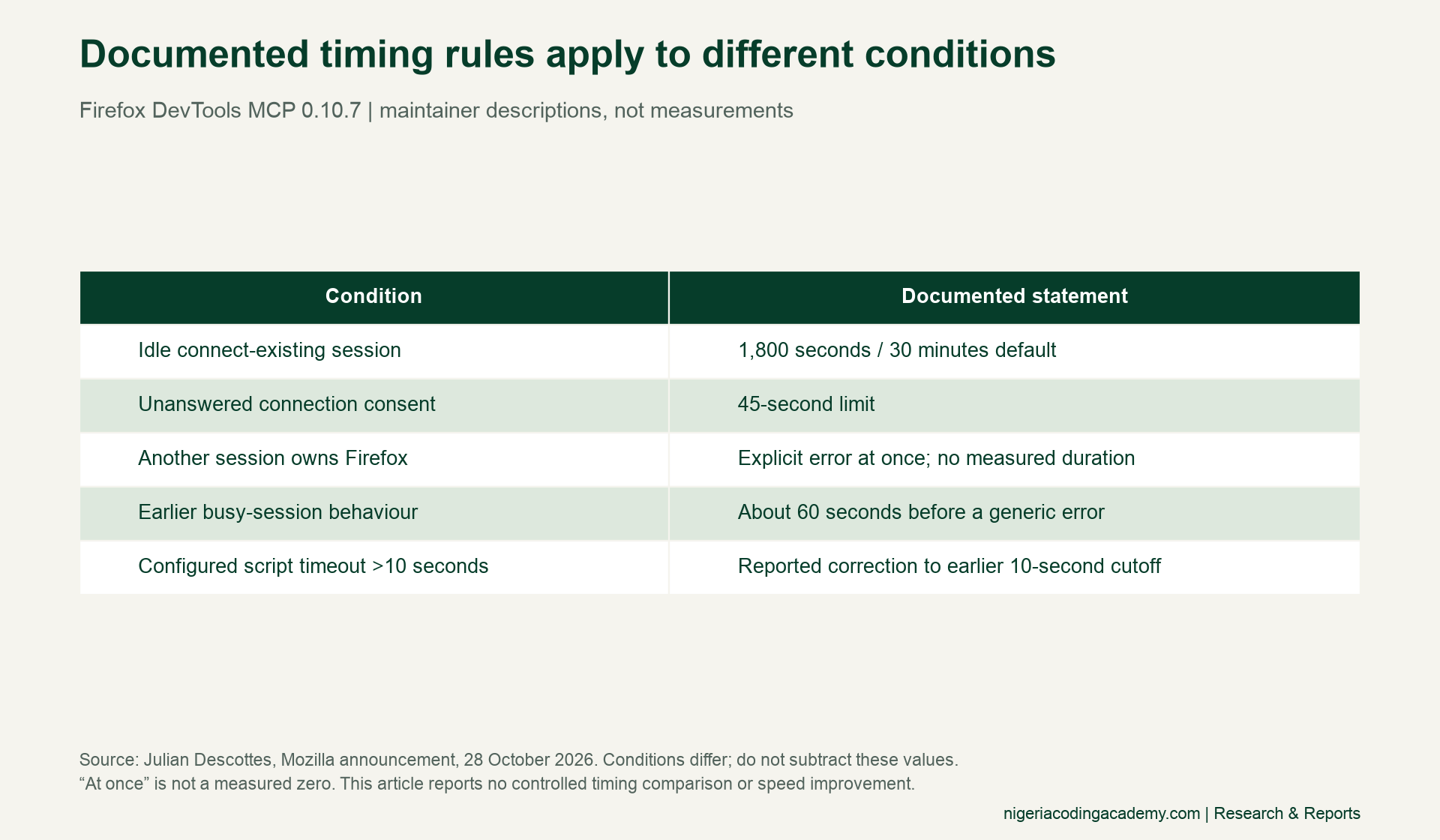
For a busy session, the maintainer describes an immediate explicit error, replacing an earlier roughly 60-second generic failure. “Immediate” is not a measured zero. The official changelog also records file-upload and timeout-related fixes. These statements describe the release; they are not timings measured by our proposed pilot.
Different conditions need different interpretations. An unanswered permission prompt and a slow application response occur at different boundaries. Subtracting their thresholds would not measure a speed improvement. Likewise, a documented fix is a reason to test a specific configuration, rather than evidence that every later run will succeed.
Prepare a dedicated Firefox DevTools MCP test setup
Use a profile reserved for your authorised local tests. Mozilla’s official repository recommends a dedicated profile and explains the tool’s browser access. Keep everyday accounts and unrelated browser work outside the experiment. Record the browser, MCP server and client versions before starting.
Then choose a page you own, with known expected behaviour and an innocuous local file. Record the page or fixture revision. Keep its initial state consistent between repetitions. A reproducible setup makes it easier to distinguish a changed application from a changed tool, browser or session.
Consent remains part of the test boundary. Accept a connection only when you intend to authorise it. Never bypass the prompt, take over another person’s session or change security protections merely to obtain a passing result. A protective refusal can be the correct result for a deliberately blocked scenario.

Plan five scenarios with separate expected outcomes
Our design includes a normal dedicated-profile connection, an occupied test session, unanswered consent, a synthetic-file upload and a benign script whose configured timeout exceeds ten seconds. Use only your own authorised test clients for the occupied-session case. Preserve the client that already owns the session.
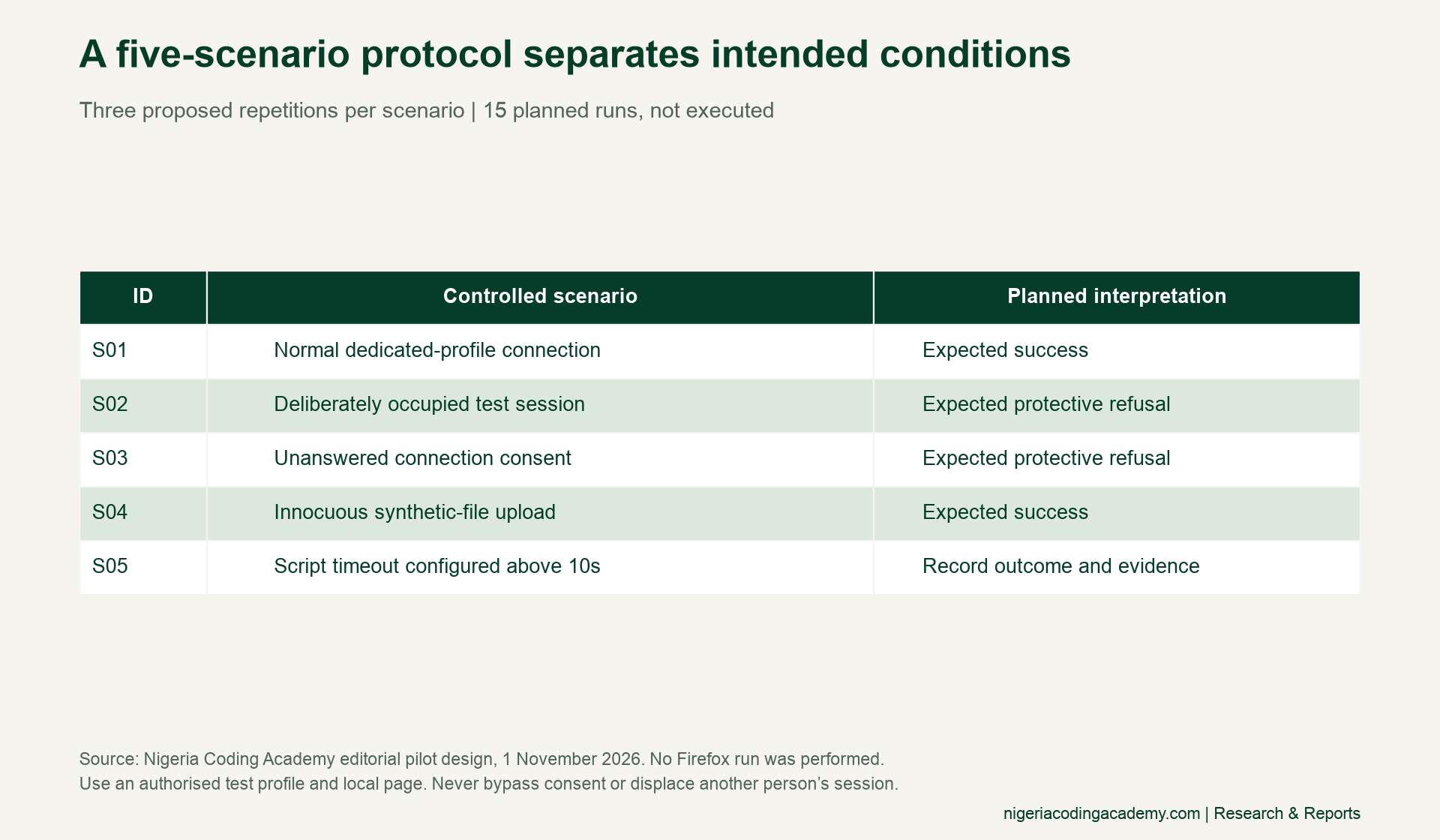
Specify the expected evidence for each scenario before running it. A normal connection needs the intended controlled page effect. The occupied and unanswered-consent scenarios need the corresponding protective response. For the upload, distinguish file selection from any later application or server acceptance.
The long-script scenario needs its actual configuration, start and end observations, tool response and page evidence. A configured timeout is a setting, not an elapsed duration. If the evidence is incomplete, preserve that uncertainty instead of choosing a convenient classification.
For that scenario, our worksheet proposes a benign local script targeting 12 seconds with a 20-second timeout. These are design settings, not observed timings. The target crosses the earlier cutoff while leaving a stated margin; record what actually happens instead of assuming the target duration was achieved.
Classify the evidence before editing application code
Our worksheet uses five categories: expected success, expected protective refusal, unexpected tool failure, application failure and inconclusive. They are editorial investigation labels, not official Firefox error codes. Use the combination of tool response and independent page observation to justify the label you choose.
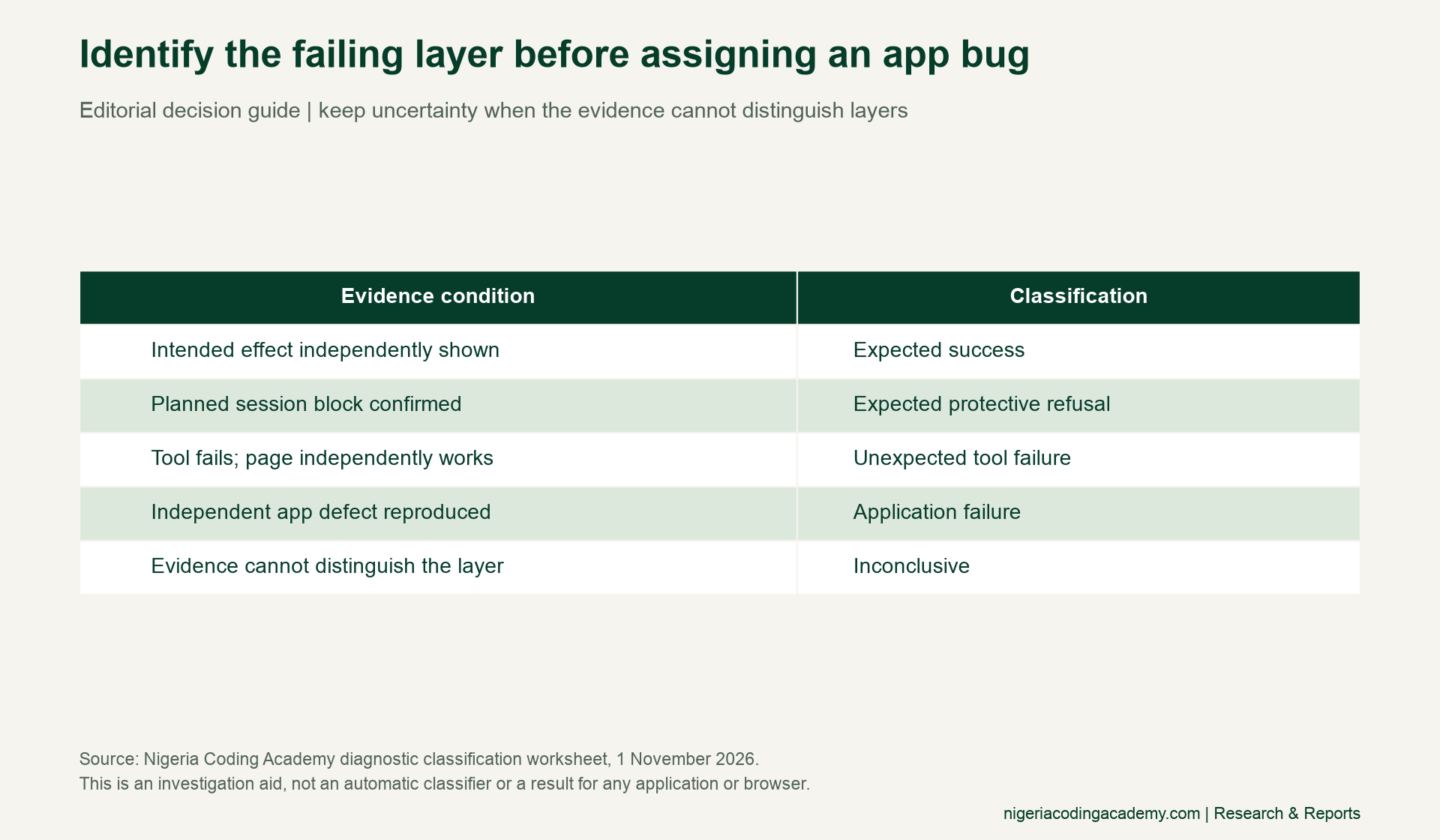
First, check whether the intended controlled effect is visible. Next, check whether a deliberately blocked condition explains the refusal. If the tool fails while the application independently behaves as expected under controlled conditions, investigate the tool boundary. Only assign an application failure when independent evidence supports that conclusion.
A generic timeout alone cannot establish the layer that failed. It may leave the result inconclusive. Write down the missing evidence and the next check that could distinguish the possibilities. Our claim-evidence exercise explains why an output label should stay within what the evidence supports.
Unlock Your Unique Tech Path
Get expert tech consulting tailored just for you. Receive personalized advice and solutions within 1-3 business days.
Get StartedKeep the 15 proposed Firefox DevTools MCP runs unfilled
Three repetitions for each of five scenarios create 15 proposed ledger rows. This is a small illustrative pilot design, not a representative performance study. Every row currently says not_executed. Actual classifications, timestamps and observed durations are blank.
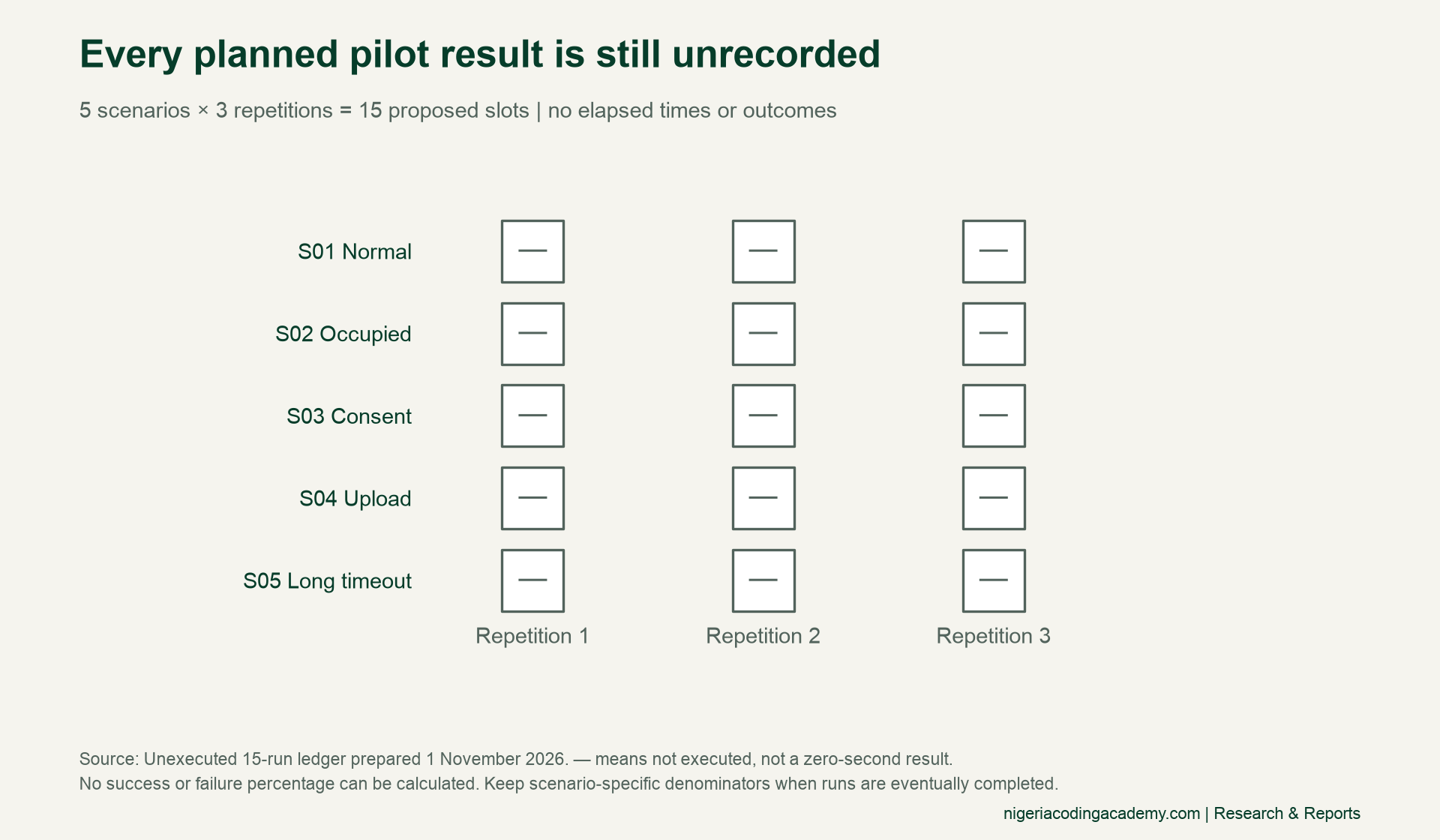
Consequently, no success or failure percentage can be calculated from this ledger. Blank time cells do not mean zero seconds. Similarly, a planned protective refusal is not an observed failure. If you later run the protocol, retain the planned total alongside the number actually completed.
Keep denominators separate by scenario. Combining deliberately occupied sessions with normal connections would hide what an overall percentage represents. For timing comparisons, retain comparable versions, settings, conditions and measurement boundaries. Show documented thresholds beside observed durations only after real observations exist.
Confirm the page effect, especially for uploads
A selected filename shows a narrow part of an upload journey. It does not establish that a server received the bytes, accepted the file or saved the intended record. For your owned test page, specify which of those claims matters and capture evidence at the appropriate boundary.
For example, file selection can use the page’s visible file state. Server acceptance needs the relevant controlled response or persisted result. Record both when the experiment claims both. Keep the test file innocuous and avoid publishing credentials, personal records or private machine paths.
The same distinction appears in our checkout state study: an intermediate event does not prove the final outcome. Our export fixture guide also separates successful file creation from reconstructed data values. Apply that discipline to browser automation too.
Write a reproducible issue report
A useful issue report joins three kinds of evidence: the versioned setup, the tool’s response and an independent page observation. Include the minimal reproduction steps, expected result, actual response and configured timeout. If you measured elapsed time, include the start and end observations and explain the boundary you timed.
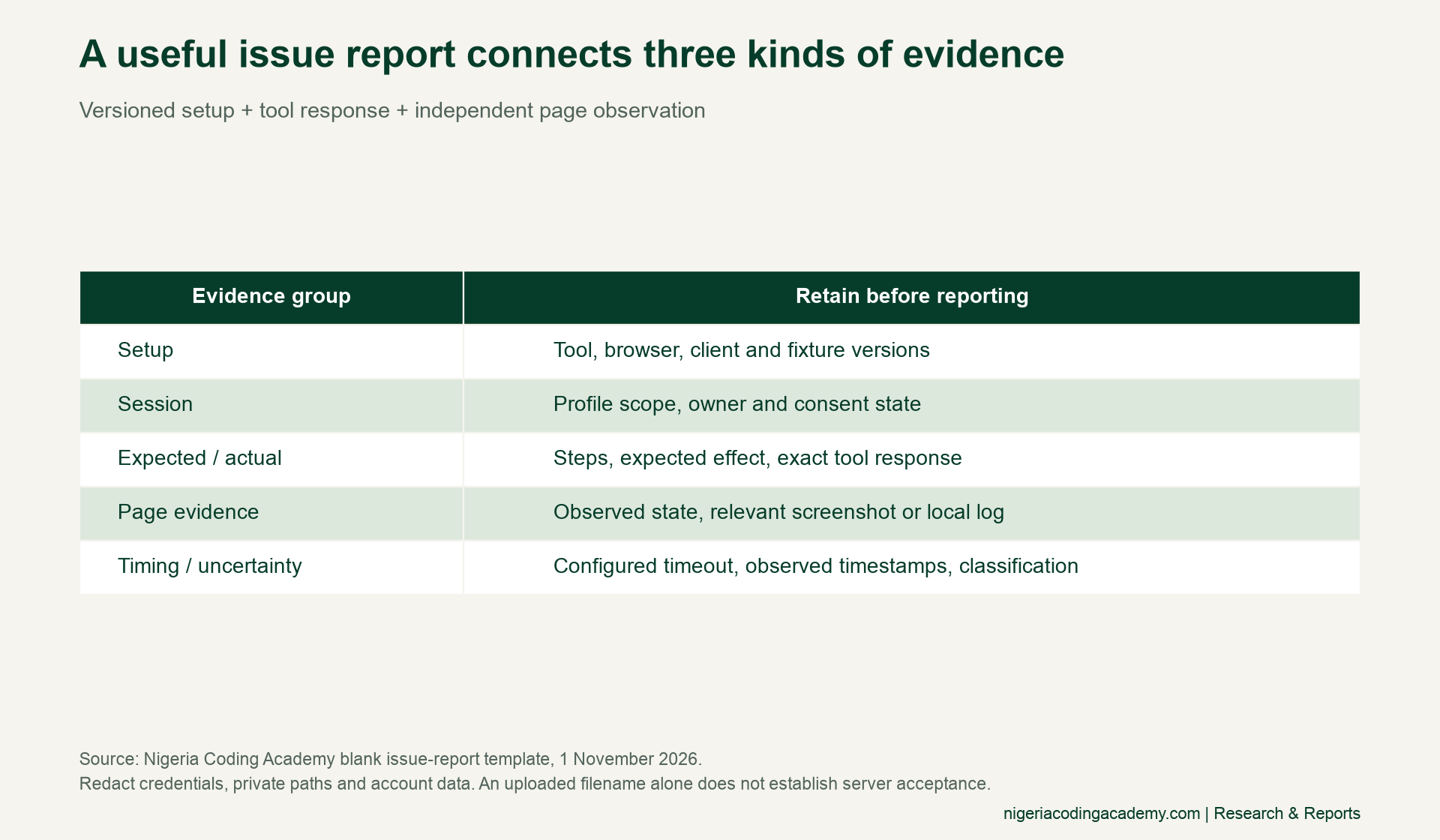
Finally, state your classification and what remains uncertain. Attach only relevant, redacted evidence. Preserve the local fixture and code revision through version control, so another developer can repeat the conditions. Do not expose an everyday browser profile or private account session to make the report convenient.
Download the protocol and reporting tools
- Documented behaviour register (CSV): scoped source statements, conditions and retrieval date.
- Unexecuted 15-run pilot ledger (CSV): five scenarios, three proposed repetitions and blank actual results.
- Diagnostic classification worksheet (CSV): five categories with evidence requirements and insufficient-evidence examples.
- Blank issue-report template (CSV): versions, session scope, steps, responses, timing and redacted evidence fields.
Read the files as UTF-8. Replace blank cells only with observations from the configuration you actually ran. Keep the original proposed ledger so readers can distinguish the design from later results. The files contain no private browser data.
Methodology, limitations and citation
Mozilla’s announcement and repository supply the release context. Our contribution is the unexecuted pilot design, evidence classification and issue-report framework. We installed no Firefox testing tool and ran no browser experiment for this article. The sources establish no Nigerian adoption, hiring demand or productivity effect, and we make none of those claims.
Suggested citation: Nigeria Coding Academy, “Firefox DevTools MCP Testing: Separate Session Failures From App Bugs,” 1 November 2026. Identify the protocol as proposed and unexecuted when citing it. Original worksheets may be reused with attribution under CC BY 4.0. External material retains its own terms. Featured and inside artwork is AI-generated conceptual illustration, not Firefox screenshots or test evidence.


