




CI checks can pass without testing files when their target selection is empty or a wrapper hides the underlying error. Our original local exercise makes both problems visible. Across eight comparisons, a deliberately flawed checker produced three false passes. A revised checker rejected the three known violations in the selected fixtures.
This is a small teaching experiment for Nigerian coding learners and project reviewers. It does not estimate how often real CI systems fail, certify software security or evaluate an AI product. The code, expected outcomes, raw receipts and downloadable tables make the result inspectable.
Why a green badge needs an evidence contract
Microsoft’s 2 November first-party account of building Copilot Cowork describes checks that appeared to succeed without doing their intended work. Reported mechanisms include a pipeline exposing its final display command’s success, a formatter receiving no files and a changed-file list becoming empty after commit.
The team’s resulting practice asks a check to report its file count and demonstrate an intentional failure. The account also describes four blocking issues people found after agent reviewers missed them. These are reported team experiences, not a controlled study.
Its headline—nine engineers merging 1,211 pull requests on 21 October—is context, not a productivity target for a beginner group. Our experiment below uses an invented repository and one simple rule. It does not attempt to reproduce that team’s software, workload or development scale.
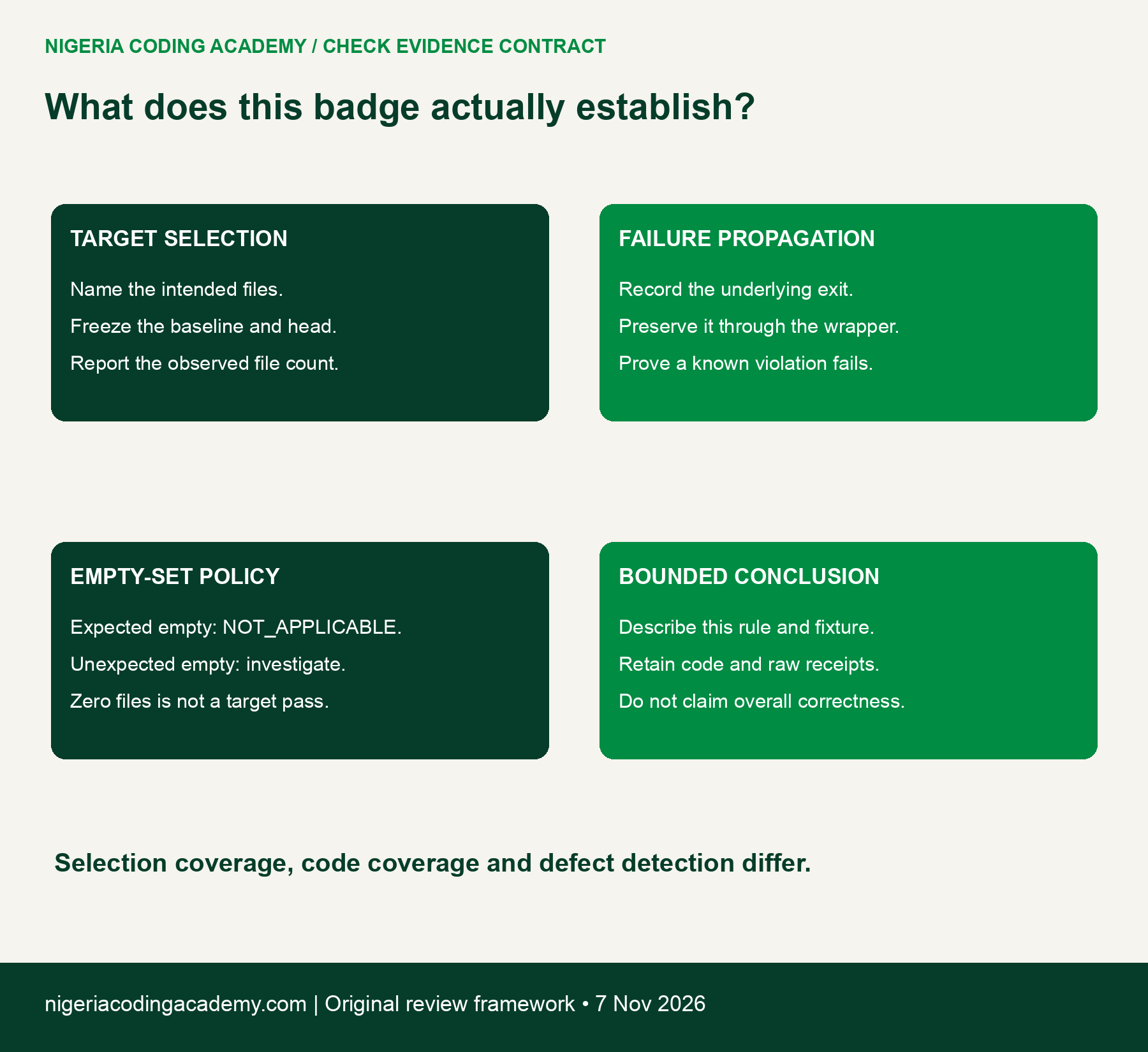
For your own project, define what the badge should establish. Name the target files, the rule, the comparison point and the expected response to a known violation. Then retain evidence that the actual check met that contract.
How CI checks pass without testing files
Our underlying checker looks for a fictional text marker, FORBIDDEN_MARKER, in selected text files. Finding the marker returns exit status 1. A clean file returns 0. This narrow rule gives the exercise a known answer without introducing a real vulnerability or private dataset.
The flawed wrapper selects files with plain git diff and sends the checker’s output through a final display command. Under the recorded Bash settings, that wrapper reports success even when the checker fails. Separately, its file selection misses staged changes and changes that have already been committed.
The official Git diff documentation explains why comparison points matter. Plain git diff compares working-tree changes with the index. Comparing against a named commit asks a different question. Therefore, “changed files” is incomplete unless you specify the endpoints and state being compared.
Our revised wrapper compares the working state with a fixed baseline commit, reports the observed file count and preserves the checker’s exit status. It also rejects an unexpectedly empty selection while permitting an explicitly declared empty case to return “not applicable.” This is a teaching implementation, not a universal production CI recipe.
Four controlled scenarios, eight executed comparisons
We created a new isolated fictional repository for each scenario. Each began with the same baseline text file. The experiment then changed that file and, where required, staged or committed the change. No existing project, remote repository or production CI setting was modified.
| Scenario | Target state | Expected applicable files | Expected result |
|---|---|---|---|
| S1 | Valid change, unstaged | 1 | True pass |
| S2 | Known marker violation, unstaged | 1 | Detected violation |
| S3 | Same kind of violation, staged | 1 | Detected violation |
| S4 | Same kind of violation, committed | 1 | Detected violation |
We ran each scenario through both checker revisions, giving four times two equals eight comparisons. The retained manifest records baseline and head commit IDs, working status and the target file’s hash. An unchanged head in an uncommitted scenario does not mean that the working file was unchanged.
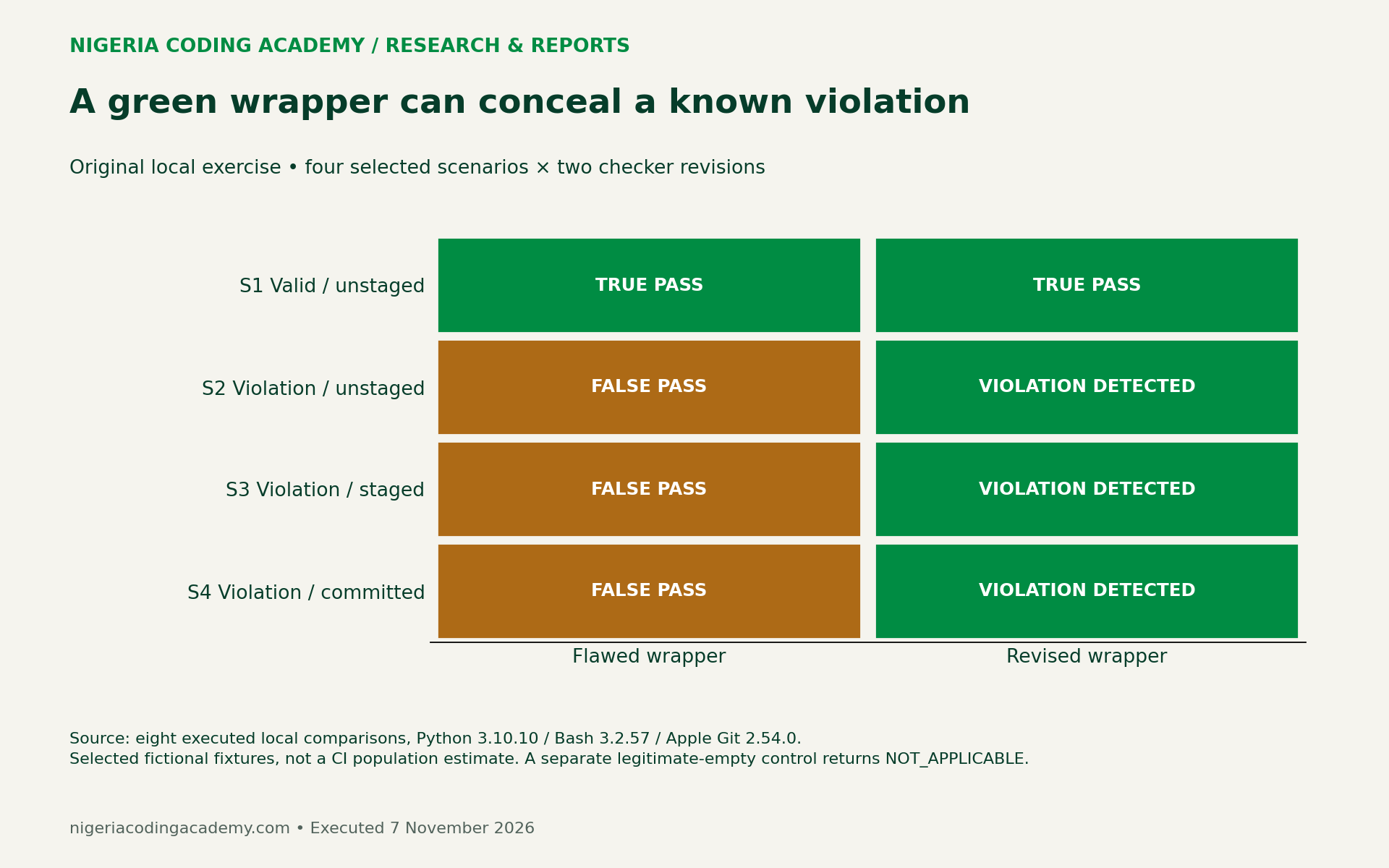
The main comparison uses Python 3.10.10, Bash 3.2.57 and Apple Git 2.54.0 on one local macOS computer. We retain the exact environment labels in a CSV. Other shells, wrapper settings and CI environments can behave differently, so verify your own execution path.
Count the files that reached the checker
The flawed wrapper inspected one target file in S1 and S2. It inspected zero in S3 and S4. Nevertheless, those two empty selections returned success because the underlying toy checker found no marker in the empty input set.
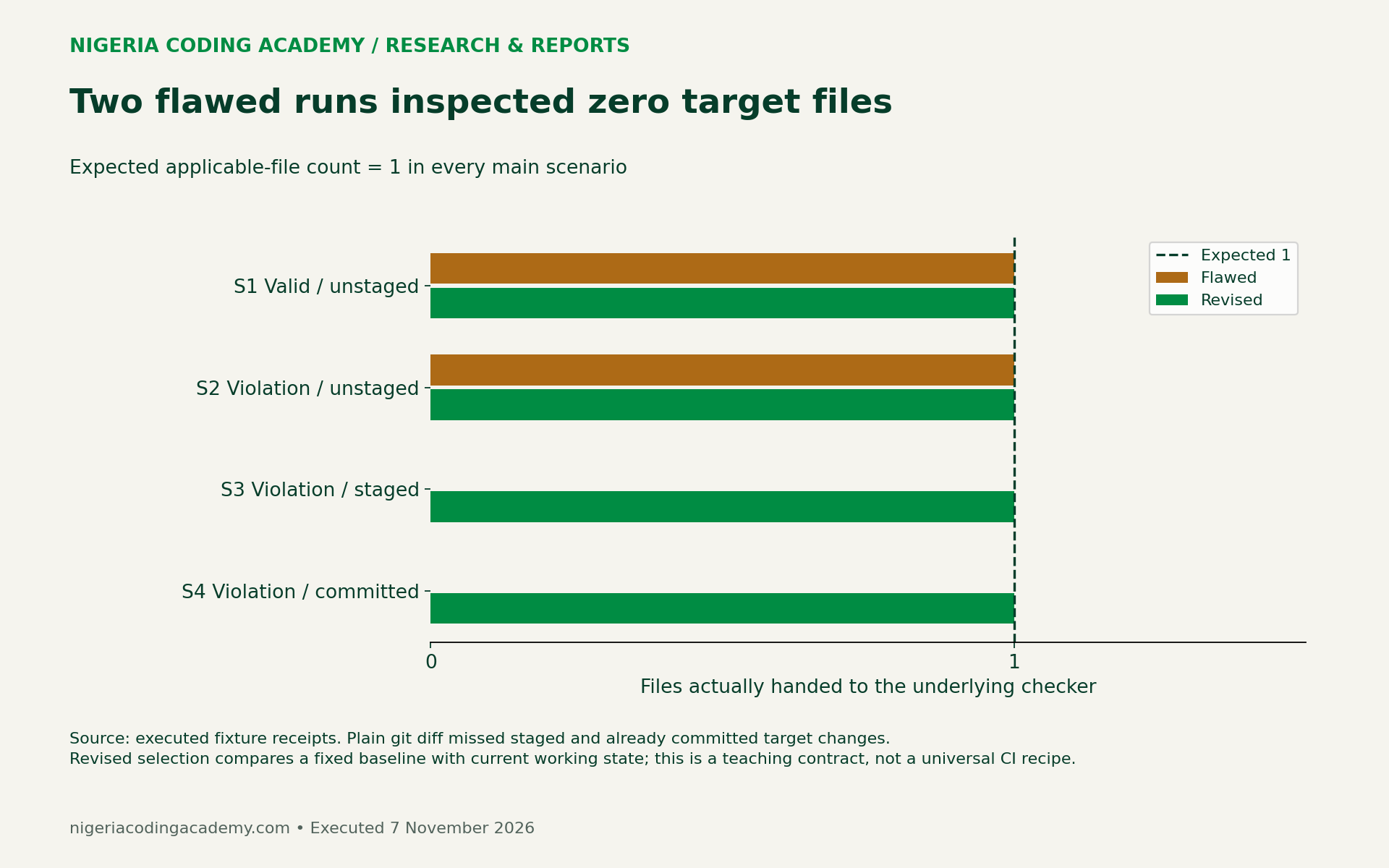
This distinction matters when presenting project evidence. A statement such as “the changed file passed” needs proof that the changed file reached the relevant rule. A successful process that examined nothing does not supply that proof.
Unlock Your Unique Tech Path
Get expert tech consulting tailored just for you. Receive personalized advice and solutions within 1-3 business days.
Get StartedAlso distinguish a legitimate empty set from an unexpected one. A documentation-only change might properly have no files for a language-specific checker. In that situation, a declared NOT_APPLICABLE result is more informative than silently presenting the target rule as passed.
We ran a separate control after restoring the target file to its baseline content. With the explicit allow-empty policy, the revised wrapper returned NOT_APPLICABLE and exit 0. That control is retained in the pack but is not one of the eight main comparisons.
Preserve the error through the wrapper
S2 shows a different problem. The underlying checker inspected one file and returned 1 for the known violation. The flawed wrapper still returned 0. Its final display operation succeeded, concealing the earlier failure from the wrapper’s caller.
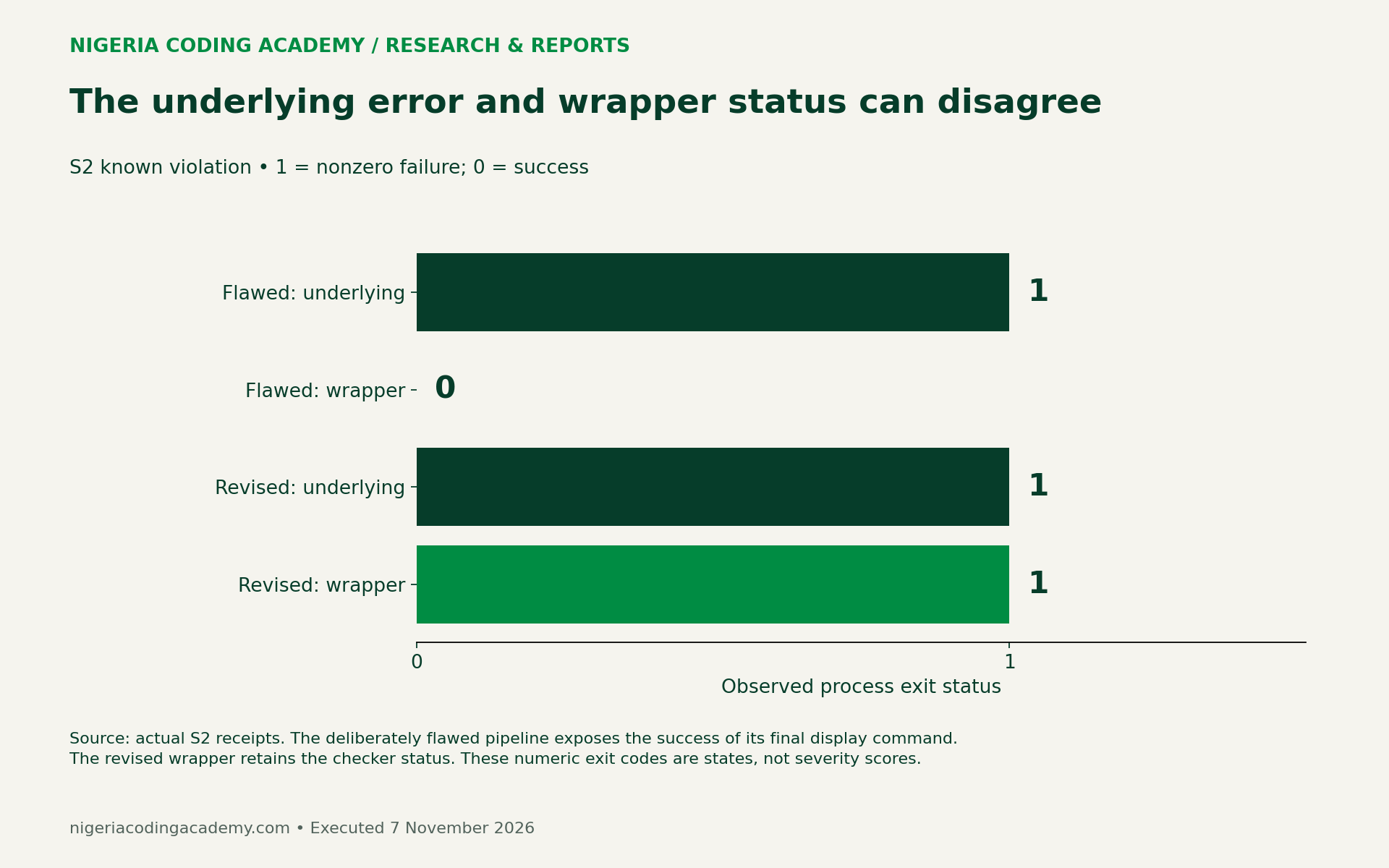
The revised teaching wrapper saves the rule’s status immediately, prints a short receipt and exits with that saved status. Review the source before adapting it. A production wrapper also needs an explicit policy for selection-command failures, deleted files, unusual paths and infrastructure errors.
Do not fix a failing gate by merely suppressing the failure or removing the target. First establish whether the failure represents a real rule violation, a legitimate skip or a problem in the test harness. Each requires a different response.
Three false passes are a fixture result, not a benchmark
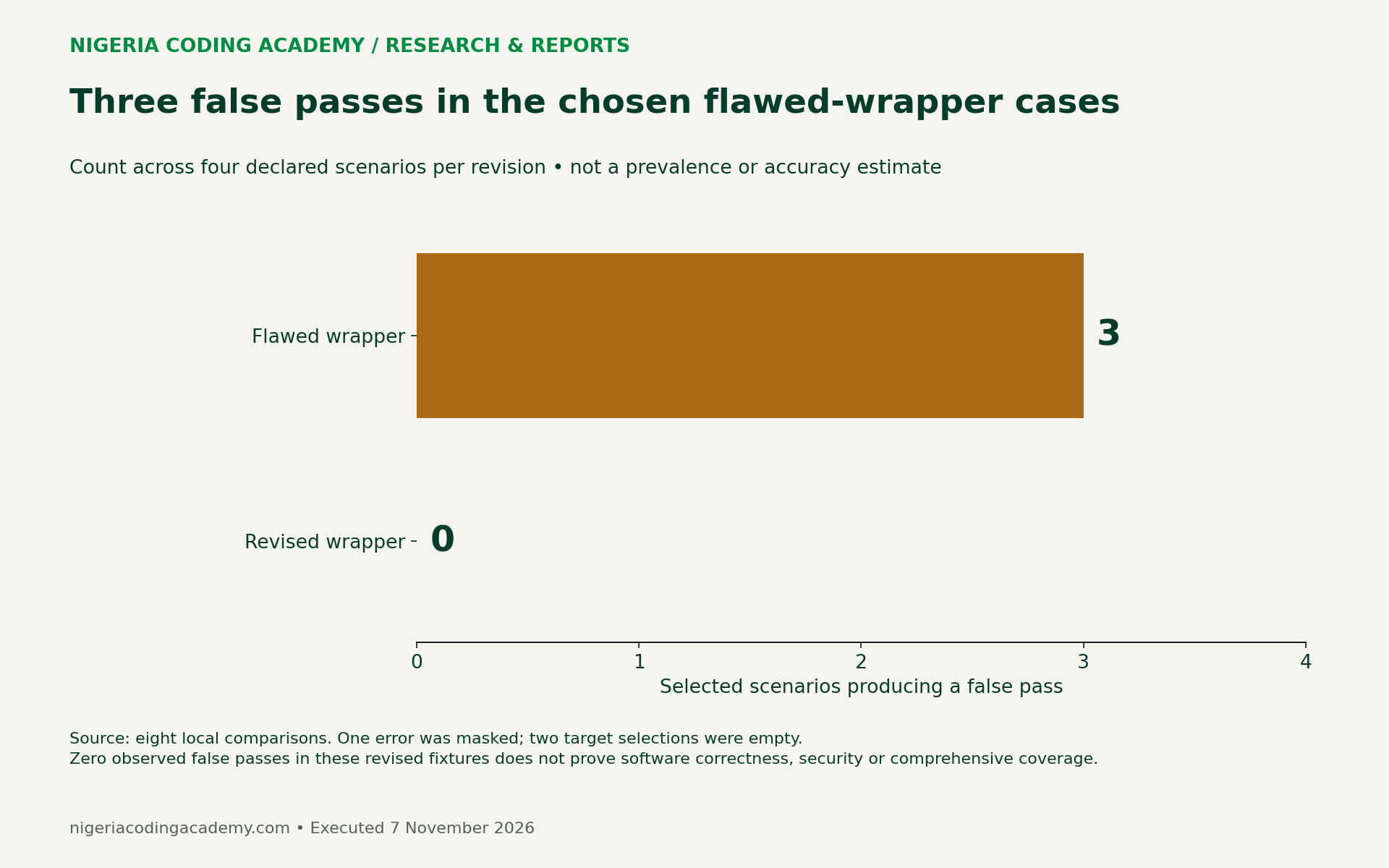
A larger-looking percentage would add little here. We deliberately chose cases that expose particular failure mechanisms. Calling three out of four a general CI failure rate would misrepresent that selection.
The experiment’s useful result is the trace: target selection, observed file count, underlying status, wrapper status and known expectation. A reviewer can inspect that trace and identify why the outcome differs between revisions.
Our GitHub Actions brownout audit addresses a different distinction: a policy-blocked attempt may create a failed run without executing jobs. Together, the guides show why neither a red nor a green badge explains the failed or successful layer by itself.
Run the fixture and review the evidence
Extract the downloadable pack into an empty folder. With Python 3 and Git installed, run python3 scripts/run_experiment.py from the extracted root. The harness invokes /bin/bash and creates new isolated repositories inside its output directory. It uses no network connection, credentials, paid API or real customer data.
Read the deliberately flawed wrapper as teaching material; do not install it as a production gate. The pack’s README lists the expected outcomes and limitations. Keep the supplied results as a baseline before rerunning or extending the exercise.
For an existing project, start with a check you own and a harmless, reversible known violation. Record the expected outcome before running it. In a study group, have another person follow the instructions and report any undocumented step. We have not claimed independent replication of this local exercise.
For broader project organization, see our version control and automation guide. Keep this article’s narrower question—whether a check inspected and rejected the intended input—separate from general pipeline setup.
Download the results and original code
- Eight comparison results (CSV) — expected files, observed files, both exit statuses and outcomes.
- Scenario execution manifest (CSV) — baseline/head IDs, working state and target hashes.
- Environment and separate control ledger (CSV) — tested versions and declared limits.
- Blank check-review worksheet (CSV) — ten unfilled rows for an authorized project review.
Download the runnable checker fixture pack (ZIP). It includes the original scripts, raw receipts, stdout/stderr records and README. Original synthetic data are CC0; original teaching code uses the MIT license included in the pack. Microsoft and Git materials retain their own rights.
Research and execution checked 7 November 2026. The main ledger contains eight selected local comparisons. A separate legitimate-empty control is labeled separately. These results do not measure Nigerian adoption, general software quality, AI accuracy or production cost savings.
Unlock Premium Source Code for Your Projects!
Accelerate your development with our expert-crafted, reusable source code. Perfect for e-commerce, blogs, and portfolios. Study, modify, and build like a pro. Exclusive to Nigeria Coding Academy!
Get Code


