






Media3 OkHttp timeout errors deserve a more useful message than a blanket “no internet” warning. If you are building an Android lesson-video app for Nigerian learners, first establish whether a response arrived, whether a file was missing and whether playback actually began. These are separate observations, even when the learner sees the same loading screen.
We ran three isolated local HTTP requests to illustrate that distinction: one timed out before a response, one returned 404 and one returned 200. These were Python requests for a harmless text fixture, not Android playback tests. The four downloadable CSVs keep those observations separate from an unrun Media3 test matrix.
Media3 OkHttp timeout errors: what changed
The official Media3 release notes list 1.12.0-rc01 on 25 November 2026. Its OkHttp extension corrects error classification when OkHttpDataSource.open fails before a response. A timeout can now receive ERROR_CODE_IO_NETWORK_CONNECTION_TIMEOUT instead of the generic connection-failed code described in the notes.
That is a specific release-candidate change, not proof that every Android network stack behaves the same way. The release table lists 1.11.1 as stable. Check the exact dependency and configured data source in your test build. We did not install this release, run an emulator or validate a production migration for this report.
Three local requests, three evidence records
Our reproducible demonstration used a server bound only to the local loopback interface. We set the client deadline to 0.15 seconds. For comparison, the delayed endpoint waited 0.8 seconds before sending headers. Meanwhile, the missing endpoint returned 404, and the available endpoint returned 200 with a small text body. Each case ran once.
| Local case | Observed evidence | What it does not prove |
|---|---|---|
| Delayed response | Timeout before a response code | That the user has no internet |
| Missing fixture | HTTP 404 received | That repeating the same URL will fix the asset |
| Available text | HTTP 200 received | That a video decoded or played |
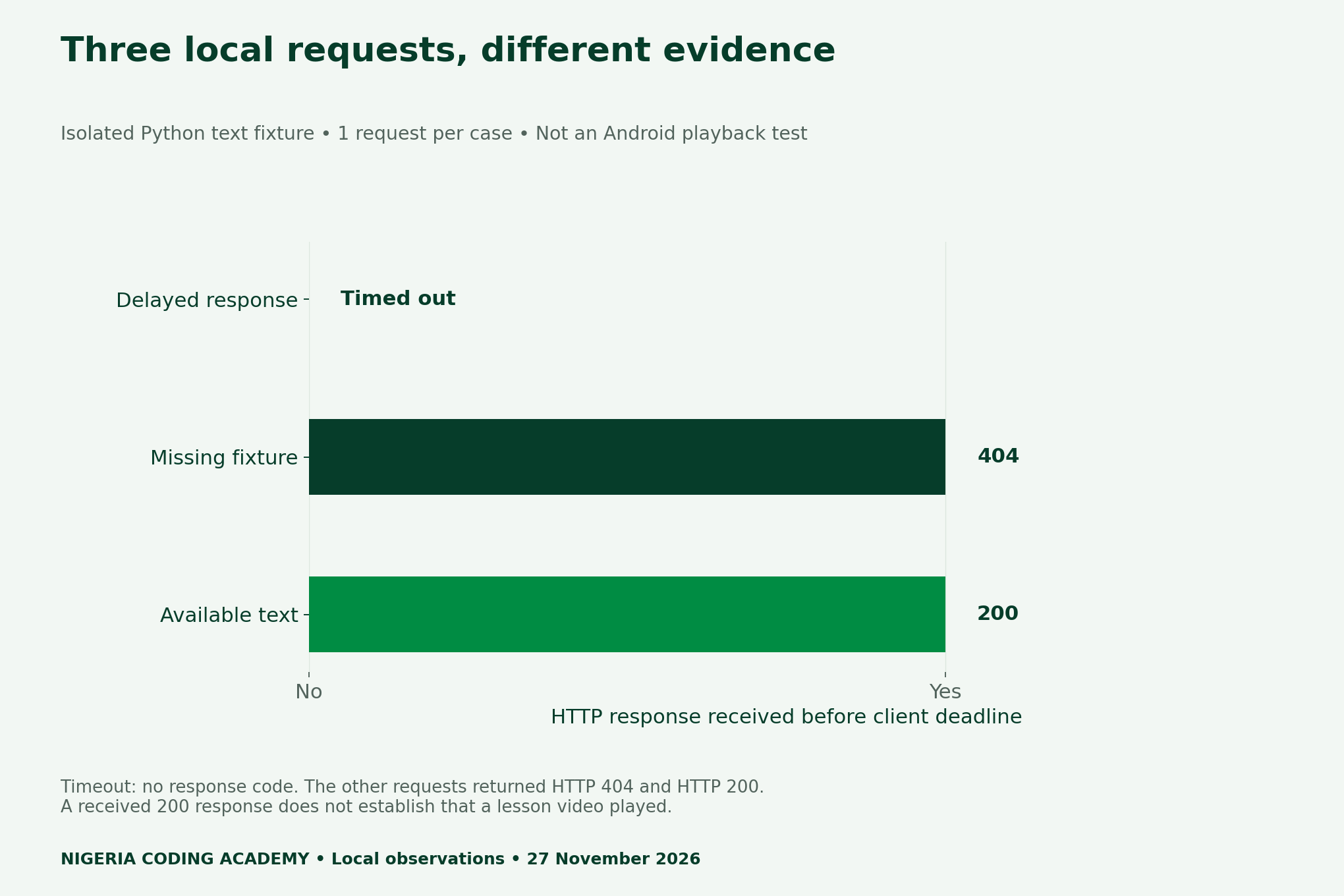
These results are deliberately small. They explain a debugging distinction rather than estimate how often learners experience it. With one request per case, there is no useful population failure rate or network-performance ranking. The measured elapsed times are retained in the CSV for reproducibility, not promoted as a service benchmark.
Build a separate Android lesson-video test matrix
Use owned, harmless sample media in an authorized test environment. Record the Media3 version, network stack, device API level and actual error. For a delayed-response case, retain the controlled delay and observed exception. In contrast, for a missing-file case, retain the actual response code instead of inferring it from a screenshot.
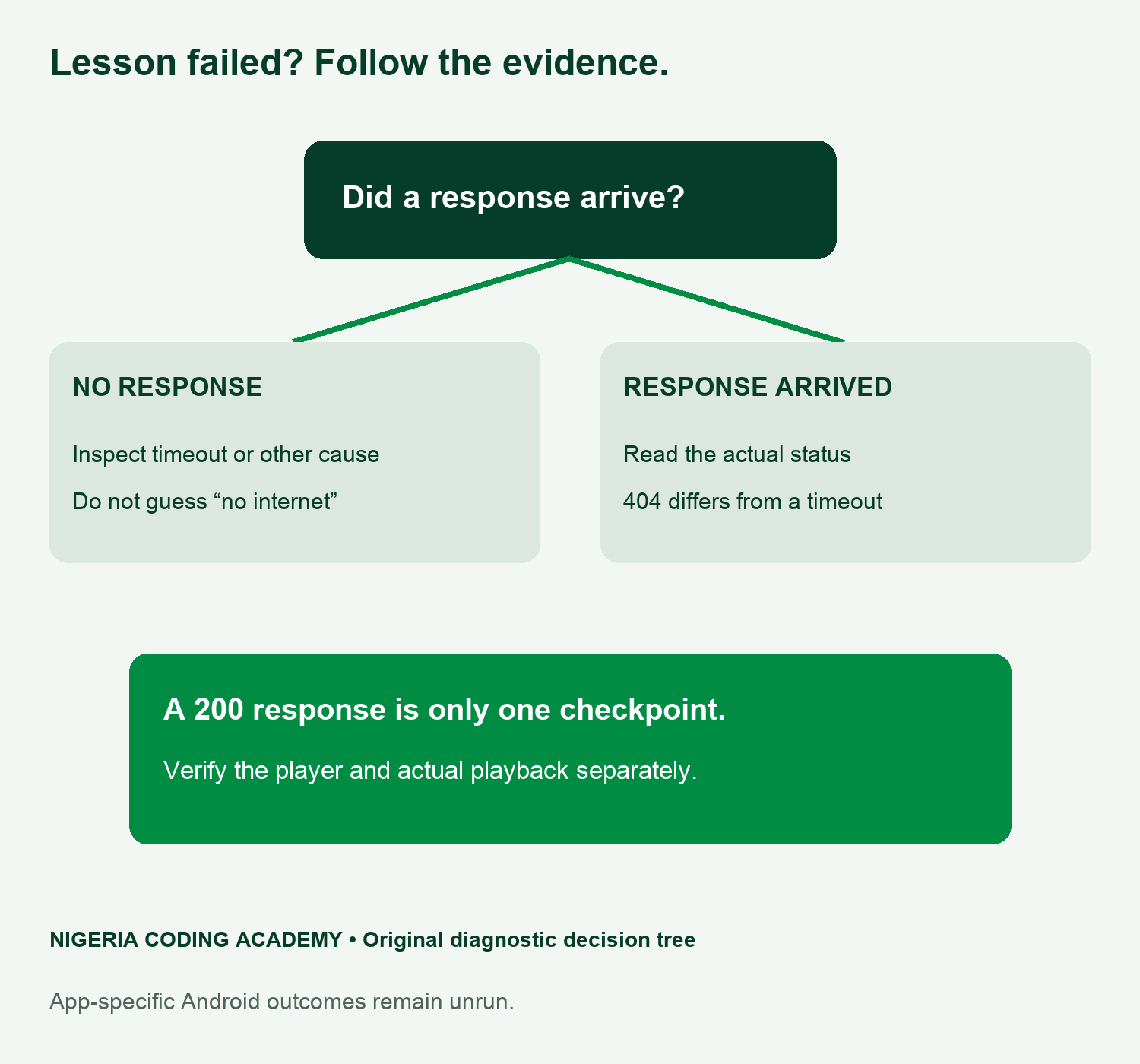
For the valid lesson case, record both player evidence and observed playback. However, a successful HTTP response is an earlier checkpoint. It does not establish that the app can decode the media, render the expected lesson or keep playing it. Our blank worksheet therefore leaves the Android result fields empty.
| Proposed Android case | Controlled setup | Evidence to retain |
|---|---|---|
| Delayed response | Controlled delay before headers | Actual exception and elapsed context |
| Missing video | Owned test URL deliberately returns 404 | Actual response code and player error |
| Valid lesson fixture | Owned compatible sample video | Observed player state and rendered playback |
Write messages that match what you know
A learner needs a useful next step. For a confirmed timeout, wording such as “The lesson did not respond in time. Try again shortly” describes the immediate observation without blaming the learner’s connection. Keep the wording consistent with the actual app evidence and the action your interface can support.
For a confirmed missing asset, an unavailable-file message and a report option may be more helpful than a connection warning. The content team may need to check the lesson URL. Repeating the same failed request indefinitely can waste time and make the app look stuck, even when the server already answered.
These are proposed interface messages, not a universal error-handler specification. Review them against the app’s real failure modes. A generic message can conceal several causes; a highly specific message can also mislead if the supporting evidence was never collected. Keep uncertain causes distinct from observed conditions.
Bound retries and protect learner context
Define a bounded retry policy before testing. Record whether the condition appears transient, whether the action is safe to repeat and how the learner can stop. Avoid a loop that keeps retrying without feedback. Preserve the lesson context where the app supports it, rather than requiring the learner to search again after each attempt.
Finally, do not ask learners to paste private media URLs, access tokens or personal identifiers into public bug reports. Use synthetic fixture labels in your shared worksheet. Retain only the technical details needed to reproduce the issue, and keep any sensitive diagnostics inside the project’s appropriate access controls.
Download the response and playback evidence tools
- Observed local HTTP demonstration (CSV)
- Blank Android playback test matrix (CSV)
- Proposed learner-message review (CSV)
- Response and playback evidence dictionary (CSV)
For another boundary that needs explicit evidence, read our Android backup and restore test matrix. Explore more mobile app development guides for practical project planning.
Method and limits
Researched on 27 November 2026. We checked the official release notes and ran the retained Python localhost script once per case. The observed conditions were a pre-response timeout, HTTP 404 and HTTP 200. No Android, Media3, OkHttp, emulator, real video playback or mobile-network experiment was performed. The Android matrix and message review are original unrun planning tools.
Unlock Your Unique Tech Path
Get expert tech consulting tailored just for you. Receive personalized advice and solutions within 1-3 business days.
Get StartedSuggested citation: Nigeria Coding Academy, “Android Lesson Videos: Stop Calling Every Failure No Internet”, 27 November 2026. Preserve the localhost-only and unrun-Android qualifications when reusing the chart or data.


